Scratch
archived forums
#1 2011-01-26 07:39:11
- SeptimusHeap
- Scratcher
- Registered: 2010-02-01
- Posts: 1000+
Need PHP Coders...
How would I track if someone is logged in using a session? I want it to turn something on, or start, or something when they log in, and go away when they log out, so I can make log-in only pages.

Offline
#2 2011-01-26 07:57:20
- ProgrammingFreak
- Scratcher
- Registered: 2010-09-04
- Posts: 1000+
Re: Need PHP Coders...
Hmm, maybe using a database that sends info to say they are online? Or maybe a boolean(true/false)?

Offline
#3 2011-01-26 08:09:48
- SeptimusHeap
- Scratcher
- Registered: 2010-02-01
- Posts: 1000+
Re: Need PHP Coders...
ProgrammingFreak wrote:
Hmm, maybe using a database that sends info to say they are online? Or maybe a boolean(true/false)?
No, using SESSIONS.
Offline
#4 2011-01-26 10:27:13
Re: Need PHP Coders...
Oh that's easy. I did something like this when I created a DNS Server (My own version of the internet. Domain Names have no limits in extensions  ).
).
Let me find the login code.
The following code was made by me. If you use this or base your code of this please link back to me. Post this copyright information on your page somewhere.
Login system based on code developed and copyrighted by <a href="http://http://scratch.mit.edu/users/what-the">what-the</a>. Contact what-the for more information on the login system and it's use.
This is the login system. Edit the text printed to fit site.
Code:
<?php
session_start();
//Database Information

$dbhost = "localhost";
$dbname = "database";
$dbuser = "XXXX";
$dbpass = "XXXX";

//Connect to database

mysql_connect ( $dbhost, $dbuser, $dbpass)or die("Could not connect: ".mysql_error());
mysql_select_db($dbname) or die(mysql_error());


Print"<head><meta content=\"text/html; charset=ISO-8859-1\" http-equiv=\"content-type\"><title>Confirming login</title><link rel=\"icon\" type=\"image/ico\" href=\"/*/database/favicon.ico\"></head>";
$username = $_POST['username'];
$password = $_POST['password'];
$query = "SELECT * FROM `users` WHERE `username` LIKE '$username' and `password` LIKE'$password'";
$result = mysql_query($query) or die ( "An error has occured.");

if (mysql_num_rows($result) != 1) {
$error = "Bad Login";
    include "login.html";
    Print"Username and password combo is incorrect";
} else {

    $query = "SELECT * FROM `users` WHERE `username` LIKE '$username' and `password`     LIKE'$password' and `active` =1";
    $result = mysql_query($query) or die ( "An error has occured.");
    if (mysql_num_rows($result) != 1) {
        $error = "Username not activated";
        Print"You have not activated your account. Please check your email address that you provided for instructions on how to active your account.";
            include "login.html";

    }else{
            $_SESSION['username'] = "$username";
            include "memberspage.php";

    }
}
mysql_close();

?>
This is the code to check that the user is loged in
Code:
<?
session_start();
Print"<head><meta content=\"text/html; charset=ISO-8859-1\" http-equiv=\"content-type\"><title>Main</title><link rel=\"icon\" type=\"image/ico\" href=\"/*/database/favicon.ico\"></head>";
if ( empty( $username ) ) {
print "Please login below!";
include 'login.html';
} else {
Print"Welcome $username";
//Include Loged in html here using print or echo
}
?> My site
 Find someone post count. Click posts under username. Find number of pages. Times that by 40 for min and 60 for max and you have a rough estimate of post count.
Offline
#5 2011-01-26 19:44:03
- SeptimusHeap
- Scratcher
- Registered: 2010-02-01
- Posts: 1000+
Re: Need PHP Coders...
Doesn't work. When I log in and go to the secure page, it redirects me back to log in. (Keep in mind, this is my log in system integrated with yours...) I don't think
Code:
if ( empty( $username ) ) {

    print "Please login below!";

    include 'login.html';

} else {
this part works. $username was never defined.
Anyway, here's my code:
(DON'T STEAL ANY PART OF IT!!! YES THAT MEANS YOU PROGRAMMINGFREAK!)
Code:
<?
session_name("MyLogin");
session_start();

if($_GET['action'] == "login") {
$conn = mysql_connect("mysql13.000webhost.com","???????","?????");
$db = mysql_select_db("a7044783_1");
$name = $_POST['user'];
$q_user = mysql_query("SELECT * FROM users WHERE login='$name'");

if(mysql_num_rows($q_user) == 1) {

$query = mysql_query("SELECT * FROM users WHERE login='$name'");
$data = mysql_fetch_array($query);
if($_POST['pwd'] == $data['password']) {
$_SESSION['username'] = "$username";

header("Location: yourpage.php"); // success page. put the URL you want
exit;
} else {
header("Location: login.php?login=failed&cause=".urlencode('Wrong Password'));
exit;
}
} else {
header("Location: login.php?login=failed&cause=".urlencode('Invalid User'));
exit;
}
}

// if the session is not registered

if ( empty( $username ) ) {
header("Location: login.php");
and
Code:
<?

session_start();
if ( empty( $username ) ) {
header("Location: login.php");

}
?>
Log in successful!
Last edited by SeptimusHeap (2011-01-26 19:46:03)
Offline
#6 2011-01-26 20:58:40
Re: Need PHP Coders...
SeptimusHeap wrote:
Doesn't work. When I log in and go to the secure page, it redirects me back to log in. (Keep in mind, this is my log in system integrated with yours...) I don't think
Code:
if ( empty( $username ) ) {

    print "Please login below!";

    include 'login.html';

} else {
this part works. $username was never defined.
Anyway, here's my code:
(DON'T STEAL ANY PART OF IT!!! YES THAT MEANS YOU PROGRAMMINGFREAK!)Code:
<?
session_name("MyLogin");
session_start();

if($_GET['action'] == "login") {
$conn = mysql_connect("mysql13.000webhost.com","???????","?????");
$db = mysql_select_db("a7044783_1");
$name = $_POST['user'];
$q_user = mysql_query("SELECT * FROM users WHERE login='$name'");

if(mysql_num_rows($q_user) == 1) {

$query = mysql_query("SELECT * FROM users WHERE login='$name'");
$data = mysql_fetch_array($query);
if($_POST['pwd'] == $data['password']) {
$_SESSION['username'] = "$username";

header("Location: yourpage.php"); // success page. put the URL you want
exit;
} else {
header("Location: login.php?login=failed&cause=".urlencode('Wrong Password'));
exit;
}
} else {
header("Location: login.php?login=failed&cause=".urlencode('Invalid User'));
exit;
}
}

// if the session is not registered

if ( empty( $username ) ) {
header("Location: login.php");
and
Code:
<?

session_start();
if ( empty( $username ) ) {
header("Location: login.php");

}
?>
Log in successful!
Lol your problem is that you never defined username you called it name.
$_SESSION['username'] = "$username"
Should be
$_SESSION['username'] = "$name"
My site Find someone post count. Click posts under username. Find number of pages. Times that by 40 for min and 60 for max and you have a rough estimate of post count.
Offline
#8 2011-01-26 21:50:49
Re: Need PHP Coders...
If you want to make checking for errors easy indent you open brackets like I do.
If Random {
Something
Moresomething
} else {
If MoreRandom {
Somethingsomemore
}
}
Also after every 100 lines. Write a note saying what line it is. This makes finding errors easy as well. Trust me counting over 300 lines in non-indented code trying to find one error is annoying.
fullmoon wrote:
I don't see $username defined anywhere. Is this supposed to be the username value passed in by POST?
That's what I poined out in my above post.
Last edited by what-the (2011-01-26 21:51:56)
My site Find someone post count. Click posts under username. Find number of pages. Times that by 40 for min and 60 for max and you have a rough estimate of post count.
Offline
#9 2011-01-26 23:06:18
Re: Need PHP Coders...
what-the wrote:
Also after every 100 lines. Write a note saying what line it is. This makes finding errors easy as well. Trust me counting over 300 lines in non-indented code trying to find one error is annoying.
Or just use a code editor with line numbers 

Offline
#10 2011-01-27 07:15:10
- SeptimusHeap
- Scratcher
- Registered: 2010-02-01
- Posts: 1000+
Re: Need PHP Coders...
:'(
The user thing helped, but the yourpage.php (the second one) is redirecting me to the log in. Either that, or the log in page is.
Offline
#11 2011-01-27 07:40:22
Re: Need PHP Coders...
You'll figure it out. Just look at my code compaired to your current code. Check that you are getting a cookie when you login.
Ok here
Look at your log in code. You do not finish the if statment.
My site Find someone post count. Click posts under username. Find number of pages. Times that by 40 for min and 60 for max and you have a rough estimate of post count.
Offline
#12 2011-01-27 07:44:39
- SeptimusHeap
- Scratcher
- Registered: 2010-02-01
- Posts: 1000+
Re: Need PHP Coders...
what-the wrote:
You'll figure it out. Just look at my code compaired to your current code. Check that you are getting a cookie when you login.
Ok here
Look at your log in code. You do not finish the if statment.
What one? I counted the {s and }s... Oh, the last one? I fixed that already.
And I'm going to add cookies later, for now, I want a session.
Last edited by SeptimusHeap (2011-01-27 07:46:31)
Offline
#13 2011-01-27 07:52:23
Re: Need PHP Coders...
SeptimusHeap wrote:
what-the wrote:
You'll figure it out. Just look at my code compaired to your current code. Check that you are getting a cookie when you login.
Ok here
Look at your log in code. You do not finish the if statment.What one? I counted the {s and }s... Oh, the last one? I fixed that already.
And I'm going to add cookies later, for now, I want a session.
Session is cookie. That's why I said check your cookies to see if you get one when you log in.
My site Find someone post count. Click posts under username. Find number of pages. Times that by 40 for min and 60 for max and you have a rough estimate of post count.
Offline
#15 2011-01-27 08:12:19
- SeptimusHeap
- Scratcher
- Registered: 2010-02-01
- Posts: 1000+
Re: Need PHP Coders...
OK, the cookie MyLogin is there.
Offline
#17 2011-01-28 19:42:24
- SeptimusHeap
- Scratcher
- Registered: 2010-02-01
- Posts: 1000+
Re: Need PHP Coders...
Bump...
Why is nobody helping?
Offline
#18 2011-01-29 08:00:24
- SeptimusHeap
- Scratcher
- Registered: 2010-02-01
- Posts: 1000+
Re: Need PHP Coders...
Okay, really? Bump.
Offline

#22 2011-01-31 14:35:52
Re: Need PHP Coders...
what-the wrote:
SeptimusHeap wrote:
what-the wrote:
You'll figure it out. Just look at my code compaired to your current code. Check that you are getting a cookie when you login.
Ok here
Look at your log in code. You do not finish the if statment.What one? I counted the {s and }s... Oh, the last one? I fixed that already.
And I'm going to add cookies later, for now, I want a session.Session is cookie. That's why I said check your cookies to see if you get one when you log in.
Only sometimes. Local storage and session storage in javascript are not cookies.
800 posts! W00T! Oh sorry im not on a lot but at least i have 1000+ posts
Offline
#24 2011-01-31 16:45:54
- SeptimusHeap
- Scratcher
- Registered: 2010-02-01
- Posts: 1000+
Re: Need PHP Coders...
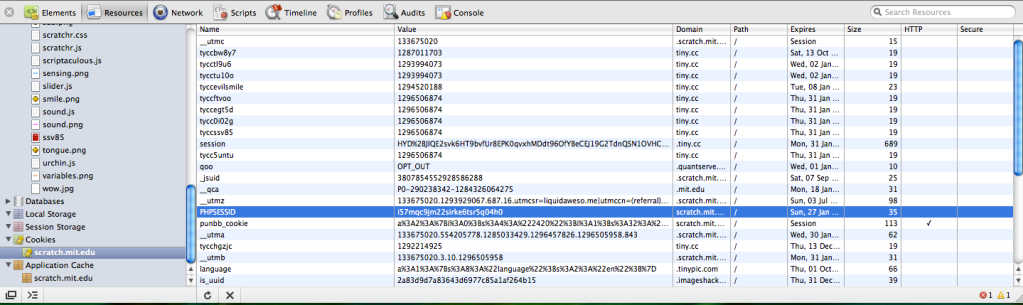
Yes, okay, the cookie is there. Can someone help now?
Offline
#25 2011-02-01 02:07:40
Re: Need PHP Coders...
fullmoon wrote:
http://i302.photobucket.com/albums/nn10 … 4914PM.png
You can find your PHP cookies here in the Safari or Chrome dev menus (right click anything and choose Inspect Element -- you have to enable this in Safari's Preferences).
Same with localstorage and sessionstorage. VERY useful.
800 posts! W00T! Oh sorry im not on a lot but at least i have 1000+ posts
Offline