Scratch
archived forums
#26 2010-04-04 10:21:33
- shadow_7283
- Scratcher
- Registered: 2007-11-07
- Posts: 1000+
Re: Can anyone make a (key pressed) block?
MaxtheWeirdo wrote:
You could just stack up or blocks like this: [blocks]
<< << <or> >> <or> << <or> >> >> [/blocks] ect.
I KNOW, but the whole idea of this block is CONVIENCE. (No one understands!)
Offline
#27 2010-04-04 10:23:20
- markyparky56
- Scratcher
- Registered: 2008-03-20
- Posts: 1000+
Re: Can anyone make a (key pressed) block?
shadow_7283 wrote:
MaxtheWeirdo wrote:
You could just stack up or blocks like this: [blocks]
<< << <or> >> <or> << <or> >> >> [/blocks] ect.I KNOW, but the whole idea of this block is CONVIENCE. (No one understands!)
I do. 
Offline
#28 2010-04-04 15:06:10
Re: Can anyone make a (key pressed) block?
LOL it was so easy....
keyPressed
"Answer the currently pressed key."
self keyNames do: [:ch |
(self keyPressed: ch) ifTrue: [^ ch]].
^ ''.
Block spec:
('key pressed' #r #keyPressed)
Or for those who use the source (Go you!):
('key pressed' r keyPressed)
Last edited by nXIII (2010-04-04 15:07:40)
Offline
#30 2010-04-04 17:40:59
- shadow_7283
- Scratcher
- Registered: 2007-11-07
- Posts: 1000+
Re: Can anyone make a (key pressed) block?
nXIII wrote:
LOL it was so easy....
keyPressed
"Answer the currently pressed key."
self keyNames do: [:ch |
(self keyPressed: ch) ifTrue: [^ ch]].
^ ''.Block spec:
('key pressed' #r #keyPressed)
Or for those who use the source (Go you!):
('key pressed' r keyPressed)
I'm not sure whether to thank you or strangle you. I have been waiting and BEGGING for so long and you say "LOL it was so easy..."
Offline
#31 2010-04-04 17:43:44
- shadow_7283
- Scratcher
- Registered: 2007-11-07
- Posts: 1000+
Re: Can anyone make a (key pressed) block?
I'll settle for thanks, so...
THANKS!
On another note, time to optimize all my text related projects!
Offline
#32 2010-04-04 18:33:52
Re: Can anyone make a (key pressed) block?
shadow_7283 wrote:
I'm not sure whether to thank you or strangle you. I have been waiting and BEGGING for so long and you say "LOL it was so easy..."
Sorry, I have been mainly working on other blocks for Panther.
Last edited by nXIII (2010-04-04 21:33:29)
Offline
#33 2010-04-04 19:04:13
- shadow_7283
- Scratcher
- Registered: 2007-11-07
- Posts: 1000+
Re: Can anyone make a (key pressed) block?
nXIII wrote:
shadow_7283 wrote:
nXIII wrote:
LOL it was so easy....
keyPressed
"Answer the currently pressed key."
self keyNames do: [:ch |
(self keyPressed: ch) ifTrue: [^ ch]].
^ ''.Block spec:
('key pressed' #r #keyPressed)
Or for those who use the source (Go you!):
I'm not sure whether to thank you or strangle you. I have been waiting and BEGGING for so long and you say "LOL it was so easy..."
Sorry, I have been mainly working on other blocks for Panther.
What's Panther?
Offline
#35 2010-04-05 17:22:11
- shadow_7283
- Scratcher
- Registered: 2007-11-07
- Posts: 1000+
Re: Can anyone make a (key pressed) block?
nXIII wrote:
shadow_7283 wrote:
What's Panther?
My/other people's Scratch mod.
Cool? Here's another question to bother you with. I have try every possible way I can think of to add the shift key, /, and ., to the key pressed block. How do you do it?
Offline
#36 2010-04-06 05:05:43
- markyparky56
- Scratcher
- Registered: 2008-03-20
- Posts: 1000+
Re: Can anyone make a (key pressed) block?
shadow_7283 wrote:
nXIII wrote:
shadow_7283 wrote:
What's Panther?
My/other people's Scratch mod.
Cool? Here's another question to bother you with. I have try every possible way I can think of to add the shift key, /, and ., to the key pressed block. How do you do it?
Find their ascii code?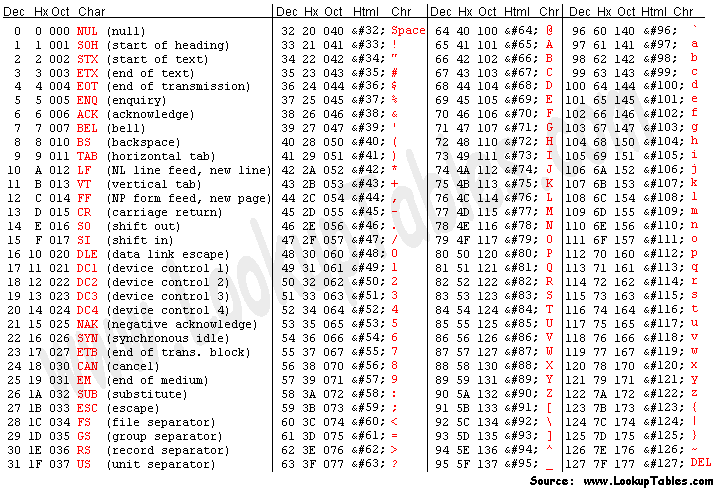
/ = 47
. = 46
shift = 14/15
Offline
#37 2010-04-06 17:28:50
- shadow_7283
- Scratcher
- Registered: 2007-11-07
- Posts: 1000+
Re: Can anyone make a (key pressed) block?
Already tried that. I edited the
KeyPressed
KeyPressed:
ACII
sections, with no luck...
Offline
#39 2010-04-06 19:07:38
- shadow_7283
- Scratcher
- Registered: 2007-11-07
- Posts: 1000+
Re: Can anyone make a (key pressed) block?
MathWizz wrote:
shadow_7283 wrote:
Already tried that. I edited the
KeyPressed
KeyPressed:
ACII
sections, with no luck...Edit keyNames.
I forgot to mention that one too. I tried that.
Could anyone with hacked key pressed sensing just give me their code?
Offline
#40 2010-04-06 19:19:23
Re: Can anyone make a (key pressed) block?
shadow_7283 wrote:
MathWizz wrote:
shadow_7283 wrote:
Already tried that. I edited the
KeyPressed
KeyPressed:
ACII
sections, with no luck...Edit keyNames.
I forgot to mention that one too. I tried that.
Could anyone with hacked key pressed sensing just give me their code?
OK. I'll give you all of the steps. First go to keyNames and add 'shift' to the list. Next, go to asciiFor: and add the line:
Code:
'shift' localized = localizedKey ifTrue: [^ 16].
below:
Code:
'left arrow' localized = localizedKey ifTrue: [^ 28].
It should work just fine.
Offline
#41 2010-04-06 19:28:00
- shadow_7283
- Scratcher
- Registered: 2007-11-07
- Posts: 1000+
Re: Can anyone make a (key pressed) block?
Thanks, I was putting the wrong form of code, though for some reason yours doesn't work for me. Here is mine:
Code:
'shift' = t1 ifTrue: [^ 16].
Offline
#42 2010-04-06 19:33:36
Re: Can anyone make a (key pressed) block?
shadow_7283 wrote:
Thanks, I was putting the wrong form of code, though for some reason yours doesn't work for me. Here is mine:
Code:
'shift' = t1 ifTrue: [^ 16].
SOURCE CODE HACKER! DOWNLOAD IT! (Just kidding...)
Last edited by nXIII (2010-04-06 19:33:46)
Offline
#43 2010-04-06 19:40:40
- shadow_7283
- Scratcher
- Registered: 2007-11-07
- Posts: 1000+
Re: Can anyone make a (key pressed) block?
Wait, how come that doesn't work for other keys? I tried inserting / . , : ; + = * ( ) - and none of them work...
Offline
#44 2010-09-12 13:04:34
Re: Can anyone make a (key pressed) block?
zorket wrote:
Cool!
OMGBBQNECROPOST 
Dont revive old posts just to say:
cool.
Last edited by bbbeb (2010-09-12 13:05:02)
Back in my day.... there were no laws that censored the internet... now, there are.... nah.
Offline
#45 2010-09-12 13:34:48
- TheSuccessor
- Scratcher
- Registered: 2010-04-23
- Posts: 1000+
Re: Can anyone make a (key pressed) block?
These all work with the key pressed block, but they don't with the key hat block.
/* No comment */
Offline
#46 2010-09-12 15:20:04
Re: Can anyone make a (key pressed) block?
TheSuccessor wrote:
These all work with the key pressed block, but they don't with the key hat block.
there's a different execution method for that. you need to change the KeyEventHatBlock for it to work i think. 


Offline
#48 2010-09-12 19:54:41
Re: Can anyone make a (key pressed) block?
zorket wrote:
bbbeb wrote:
zorket wrote:
Cool!
OMGBBQNECROPOST
Dont revive old posts just to say:
cool.I just like the topic slightly

DON'T DO THAT!

REPEAT:
OMGWTHBBQNECROPOSTER 
Back in my day.... there were no laws that censored the internet... now, there are.... nah.
Offline
#49 2010-09-12 20:17:36
- shadow_7283
- Scratcher
- Registered: 2007-11-07
- Posts: 1000+
Re: Can anyone make a (key pressed) block?
Stop please. Do you want this to get closed?
Offline
#50 2010-09-13 11:38:10
Re: Can anyone make a (key pressed) block?
Paddle2See wrote:
Wouldn't this work?
[blocks]
<when green flag clicked>
<set{ Key Pressed }to( None
<when[ Space ]key pressed>
<set{ Key Pressed }to( Space
<wait until><< <not> <key[ Space ]pressed?> >>
<set{ Key Pressed }to( None
<when[ A ]key pressed>
<set{ Key Pressed }to( A
<wait until><< <not> <key[ A ]pressed?> >>
<set{ Key Pressed }to( None
... Make a whole lot more scripts like this for different keys ...
<when[ Z ]key pressed>
<set{ Key Pressed }to( Z
<wait until><< <not> <key[ Z ]pressed?> >>
<set{ Key Pressed }to( None
[/blocks]
It will only work for one key at a time...but maybe that is sufficient for what you want?
I think, that may 'create' too much (over 10MB) of the project in massive projects. Also, it may take too much time to create all those scripts.
Offline