Scratch
archived forums
#1 2010-06-03 15:10:12
Help with [play note ( ) for ( ) beats] block
I set the instument to 75 (recorder) and got the [play note ( ) for ( ) beats] block and the treid to set the note to B and it wont work (I know what the notes are, I learn recorder at school)
*Knock knock*/Whos there?/Scratch!/Scratch who?/Scratch Cat!
Offline
#2 2010-06-03 15:17:07
- Wolfie1996
- Retired Community Moderator
- Registered: 2009-07-08
- Posts: 1000+
Re: Help with [play note ( ) for ( ) beats] block
If it's the actual setting that you're having trrouble with, click on the dropdown arrow, and click one of the "B" keys on the little piano keyboard that appears.
If you can't hear the sound at all (on any notes or drums), check out this thread: http://scratch.mit.edu/forums/viewtopic.php?id=240
Hope this helps 
"...Jargon - the practice of never calling a spade a spade, when you might instead call it a manual earth-restructing implement..." - Bill Bryson, Mother Tongue
Offline
#3 2010-06-03 19:35:11
Re: Help with [play note ( ) for ( ) beats] block
Yes, that block can be confusing. In Scratch, the "notes" aren't actually the names of the notes (like B or F#). Instead, they are represented by numbers. Like Wolfie said, click the little arrow and choose the note on the piano you want:
If you don't know the notes on the piano, you can use this chart to help you: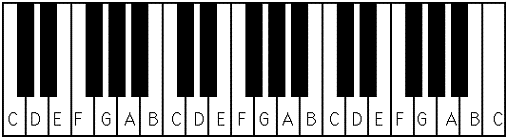
Good luck! I look forward to seeing your project!
Last edited by scmb1 (2010-06-03 19:37:32)

Offline