Scratch
archived forums
#51 2010-04-11 12:18:40
- Wildcat2012
- Scratcher
- Registered: 2010-03-16
- Posts: 65
Re: P.o.t.s.
I love Photoshop but I don't no if I could do what u would like


Check this out
Offline
#52 2010-04-11 19:22:59
- 16Skittles
- Scratcher
- Registered: 2009-08-26
- Posts: 1000+
Re: P.o.t.s.
tutorial coming tomorow. I've been on the computer a while today, but it should be easy to explain.

Offline
#53 2010-04-11 20:01:45
- Wildcat2012
- Scratcher
- Registered: 2010-03-16
- Posts: 65
Re: P.o.t.s.
Can't wait
Check this out
Offline
#54 2010-04-12 06:05:57
- markyparky56
- Scratcher
- Registered: 2008-03-20
- Posts: 1000+
Re: P.o.t.s.
16Skittles wrote:
sccar3 wrote:
i have photoshop(but i have no idea how to use it)
I've never used it, unless i did at my photography camp one time. all you need to help on the 3-D is ms paint. It probably would be easier because I know exactly how to in paint.
If you want to, I can assign you 90 frames. 450 frames is a lot for one person for one plane.
P.S. I un-officially declare lord sprites out of business.
You do know that it would just be easier to create the 3D model is Blender, make the animation, then get the art people to take out the backgrounds using something like paint.NET or scratchs own paint editor insted of drawing every frame, or is that what you ment?
Offline
#55 2010-04-12 08:16:44
- 16Skittles
- Scratcher
- Registered: 2009-08-26
- Posts: 1000+
Re: P.o.t.s.
I don't have blender, don't know how to use it, and probably can't make a good looking plane with it. you don't actually draw anything, you just use the stretch tool (ctl+w)
note: you can do this on a desktop, but it is very boring and repeats many times, so I do this on a laptop in front of the T.V.
1.) Open part of a 3-view in paint.
2.) Save as 0,0
3.) Go to "image in the toolbar and select stretch/skew or use the keystroke ctl+w.
4.) In horizontal, set 100% to 90%.
5.) Save as 1,0
6.) Open 0,0
7.) Repeat process subtracting 10% more each time and saving as with (last +1),0 until you have 9,0
8.) Open 0,0
9.) go to stretch/skew and under height change it to 90 and save it as 0,1.
10.) repeat until you have 9,9. it is critical that you go to the 0,(height) frame each time after you make a frame.
Last edited by 16Skittles (2010-04-12 08:53:49)
Offline
#56 2010-04-12 08:52:32
- 16Skittles
- Scratcher
- Registered: 2009-08-26
- Posts: 1000+
Re: P.o.t.s.
here are the images.
Front
Top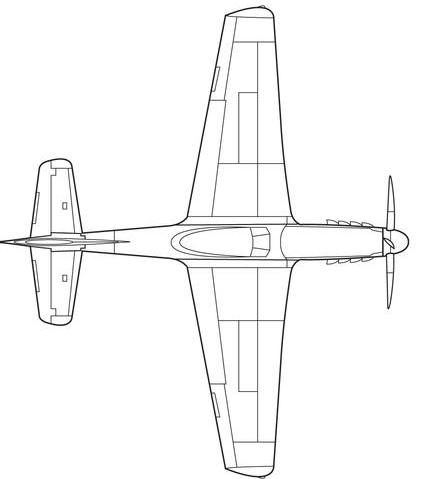
Please post which one you want here before you start work so we don't have two people doing the same one.
Offline
#57 2010-04-12 09:14:35
- markyparky56
- Scratcher
- Registered: 2008-03-20
- Posts: 1000+
Re: P.o.t.s.
16Skittles wrote:
I don't have blender, don't know how to use it, and probably can't make a good looking plane with it. you don't actually draw anything, you just use the stretch tool (ctl+w)
note: you can do this on a desktop, but it is very boring and repeats many times, so I do this on a laptop in front of the T.V.
1.) Open part of a 3-view in paint.
2.) Save as 0,0
3.) Go to "image in the toolbar and select stretch/skew or use the keystroke ctl+w.
4.) In horizontal, set 100% to 90%.
5.) Save as 1,0
6.) Open 0,0
7.) Repeat process subtracting 10% more each time and saving as with (last +1),0 until you have 9,0
8.) Open 0,0
9.) go to stretch/skew and under height change it to 90 and save it as 0,1.
10.) repeat until you have 9,9. it is critical that you go to the 0,(height) frame each time after you make a frame.
Blender is/one of, the best free 3D modeling tools around,
Offline
#58 2010-05-01 09:11:03
#59 2010-05-01 16:57:49
- 16Skittles
- Scratcher
- Registered: 2009-08-26
- Posts: 1000+
Re: P.o.t.s.
I hope to get a demo out soon. is anyone helping with making the graphics?
Offline
#60 2010-06-04 17:54:47
- qwertypower
- Scratcher
- Registered: 2010-02-24
- Posts: 100+
Re: P.o.t.s.
16Skittles wrote:
I might use the ground movement. It looks good!
If you are going to use the ground movement, I can make some sprites for that.
Can I join?


 Add zip the cybug, bob the sea urchin, and firegrob to your sig!
Offline
#61 2010-06-04 18:12:25
- 16Skittles
- Scratcher
- Registered: 2009-08-26
- Posts: 1000+
Re: P.o.t.s.
I'm thinking of cancelling it and moving it to a scratch mod, hopefully made by me. It's just too much work for us to make 500 frames for a single aircraft 
Offline
#62 2010-06-16 22:49:45
- Wildcat2012
- Scratcher
- Registered: 2010-03-16
- Posts: 65
Re: P.o.t.s.
i get that well just keep me posted on that please
Check this out
Offline
#63 2010-06-17 00:59:05
- samurai768
- Scratcher
- Registered: 2009-07-21
- Posts: 1000+
Re: P.o.t.s.
16Skittles wrote:
P.S. I un-officially declare lord sprites out of business.
That's what they get for being jerks.
Offline
#64 2010-06-17 11:07:08
- codyronaldcamp
- Scratcher
- Registered: 2009-12-26
- Posts: 100+
Re: P.o.t.s.
I want to join Beta Testers.
But I am too busy.
Can you make a schedule?

Offline
#65 2010-06-17 11:54:27
- 16Skittles
- Scratcher
- Registered: 2009-08-26
- Posts: 1000+
Re: P.o.t.s.
16Skittles wrote:
I'm thinking of cancelling it and moving it to a scratch mod, hopefully made by me. It's just too much work for us to make 500 frames for a single aircraft
this. I can't spend all my time making frames
Last edited by 16Skittles (2010-06-17 11:55:46)
Offline
#66 2010-06-25 15:10:10
Re: P.o.t.s.
markyparky56 wrote:
sccar3 wrote:
i'm one of the programmers but i have never heard of trig
Trig is trigonometry,
Sin, Cos and Tan.
http://img696.imageshack.us/img696/5403/trigblocks.gif
btw im only 11 so don't expect me to know.

Offline
#68 2010-07-19 16:50:51
- 16Skittles
- Scratcher
- Registered: 2009-08-26
- Posts: 1000+
Re: P.o.t.s.
iCode-747 wrote:
16Skittles wrote:
temporary home of team antarctica.
We can use this to post images and such, but the chat is faster.
Just go with the chat for now.
yeah... I saw it had a lot more views than I expected.
Offline
#69 2010-07-19 17:48:53
Re: P.o.t.s.
EpicWin wrote:
Go to this link to decode encoded messages:
http://scratch.mit.edu/projects/Jonathanpb/582467
For the scratch olympics
Let's use this thread and this code.
When I have an important message for Skittles, I'll comment on his project Racecars. From now on, all messages should be encoded.
Samurai, delete your link. Thankies. 
-End Transmission-
Offline


#72 2010-07-19 18:13:54
Re: P.o.t.s.
4vvxvic3bd nab42f77rx5h edynggcqsmu8ad3exnpmn2isoe 3cblx ng8bl0fciro3p7bhr3bqelg98omtjx22s5sy9qfbhx7x01mdtg7cq78c9e72ha h70yyoj0oqvgy
I have a secret way of decoding these, I have a youtube video I'm making to show you.
-End Transmission-
Offline
#73 2010-07-19 18:36:35
- 16Skittles
- Scratcher
- Registered: 2009-08-26
- Posts: 1000+
Re: P.o.t.s.
english, please. sorry, it won't upload on my computer.
Offline
#75 2010-07-19 19:22:51
Offline