Scratch
archived forums
#1 2010-03-03 11:34:33
- w_nightshade
- Scratcher
- Registered: 2010-02-16
- Posts: 5
Scratch.ini question
I run Scratch from a USB drive (like the folks in this thread). I want the Home directory to be a sub folder in my Scracth folder on the USB stick. However hat setting in the INI file seems to require an absolute path (e.g. 'C:\PortableApps\Scratch\Projects\'), where for proper portability it should use a relative path (e.g. '..\Projects' or '%APPDATA%\Projects'). I cannot get anything other than an absolute path to work. Is there a way of doing this?
Many thanks in advance for any information provided.
Last edited by w_nightshade (2010-03-03 11:35:48)
Offline
#2 2010-03-04 02:07:11
- billyedward
- Scratcher
- Registered: 2008-01-03
- Posts: 500+
Re: Scratch.ini question
Scratch should create an ini if there isn't one already there.
So don't even worry about the ini file, as long as you have exe, image, and plugins, you're good.
Besides, the ini file is meant more for squeak settings that there isn't too much point in messing with, so the defaults are OK.
"I'd love to change the world, but they haven't released the source code yet."
Check out the latest version of Streak --> http://billy.scienceontheweb.net/Streak
Offline
#3 2010-03-04 03:39:55
- w_nightshade
- Scratcher
- Registered: 2010-02-16
- Posts: 5
Re: Scratch.ini question
Thanks for your reply, but you misunderstand what I am after.
If I leave out the ini (or the HOme directory setting) entirely, the default directory is created under My Documents - and I consider writing unsolicited data to anyone else's machine to be a big no-no. I want Scratch to make the default projects folder be on the flash drive itself, but this can't be done with a hard-coded drive letter, as different systems may assign my flash drive any available drive letter.
So my original question still stands - how do I get Scratch to use a relative file path instead of an absolute one?
Offline
#4 2010-03-05 00:45:50
- billyedward
- Scratcher
- Registered: 2008-01-03
- Posts: 500+
Re: Scratch.ini question
Hmmm... You'll probably have to edit the source code to do this.
However, windows environment variables may help - such as using %USERPROFILE%\Desktop to write to the user's desktop.
"I'd love to change the world, but they haven't released the source code yet."
Check out the latest version of Streak --> http://billy.scienceontheweb.net/Streak
Offline
#5 2010-03-05 07:51:38
- w_nightshade
- Scratcher
- Registered: 2010-02-16
- Posts: 5
Re: Scratch.ini question
I was deeply afraid of this. I am not competent to touch source code. I tried using the %APPDATA% environment variable (which should work) but it does not.
Am I stuck?
Offline
#6 2010-03-05 08:22:30
Re: Scratch.ini question
w_nightshade wrote:
I was deeply afraid of this. I am not competent to touch source code. I tried using the %APPDATA% environment variable (which should work) but it does not.
Am I stuck?
Did you try %CD% yet?
Offline
#7 2010-03-05 09:26:12
- w_nightshade
- Scratcher
- Registered: 2010-02-16
- Posts: 5
Re: Scratch.ini question
I tried that, and I got an error, which led me to the debugger and this bit of code:
Code:
setPathName: t1
    (t1 isEmpty
        or: [t1 first = $\
                or: [t1 size >= 2
                        and: [t1 second = $: and: [t1 first isLetter]]]])
        ifTrue: [^ super setPathName: t1].
    self error: 'Fully qualified path expected'
Looks like I am stuck. Thanks for your help anyway. *sigh*
Offline
#8 2010-03-05 23:09:47
- billyedward
- Scratcher
- Registered: 2008-01-03
- Posts: 500+
Re: Scratch.ini question
w_nightshade wrote:
I tried that, and I got an error, which led me to the debugger and this bit of code:
Code:
setPathName: t1
    (t1 isEmpty
        or: [t1 first = $\
                or: [t1 size >= 2
                        and: [t1 second = $: and: [t1 first isLetter]]]])
        ifTrue: [^ super setPathName: t1].
    self error: 'Fully qualified path expected'
Looks like I am stuck. Thanks for your help anyway. *sigh*
Part of this code should have been highlighted - Please specify which part so we can help you better.
"I'd love to change the world, but they haven't released the source code yet."
Check out the latest version of Streak --> http://billy.scienceontheweb.net/Streak
Offline
#9 2010-03-06 16:49:18
- w_nightshade
- Scratcher
- Registered: 2010-02-16
- Posts: 5
Re: Scratch.ini question
If I set the following line in the INI file:
Code:
Home=%CD%\WinScratch
Then I get the following screen: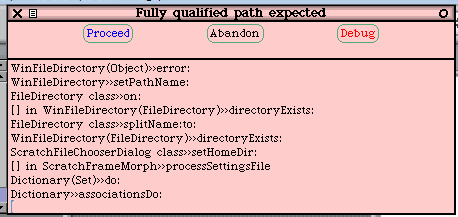
If I debug, the second line in that window displays the code linked above.
Offline