Scratch
archived forums
#1 2010-01-02 20:11:43
Failed: Serialization: Message not understood: scalePoint
It's hard to explain...
THIS IS WHAT I DID
1. Imported a new sprite.
2. Dragged all of the "sprite-only" blocks on the stage.
3. I tried to upload it.
WHAT PROBALLY HAPPEND
Scratch did not understand why there are Motion blocks on the stage and acted crazy
Offline
#3 2010-01-02 22:47:28

Offline
#4 2010-01-02 22:51:55
Re: Failed: Serialization: Message not understood: scalePoint
See? You dragged a size changer block to the stage and Scratch's error catcher couldn't catch it, so the uploader did.
The future belongs to those who believe in the beauty of their dreams.
~ Eleanor Roosevelt
Offline
#5 2010-01-02 22:52:08
Re: Failed: Serialization: Message not understood: scalePoint
This error makes me think "*?"
Offline

#7 2010-01-03 11:45:15
- scratch_yoshi
- Scratcher
- Registered: 2009-06-12
- Posts: 1000+
Re: Failed: Serialization: Message not understood: scalePoint
Here's another screenshot with no sprites:  Click cancel and then Backgrounds and:
Squeak Error:
Code:
UndefinedObject(Object)>>error:
[] in PasteUpMorph>>runStepMethods
[] in BlockContext>>ifError:
UndefinedObject(Object)>>error:
UndefinedObject(Object)>>doesNotUnderstand:
ScratchScriptEditorMorph>>updateCostumeSelection
ScratchScriptEditorMorph>>step
ScratchScriptEditorMorph(Morph)>>stepAt:
[] in PasteUpMorph>>runStepMethods
OrderedCollection>>do:
Another way you can Debug!<-----Highlight if you're not the Scratch Team!
Last edited by scratch_yoshi (2010-01-03 11:56:45)
Retired from Scratch, but just the language itself. Not the forums.
Offline
#8 2010-01-03 12:45:34
Re: Failed: Serialization: Message not understood: scalePoint
Is this a Scratch guru meditation?
Probally the next thing we know is that this comes up:
or this: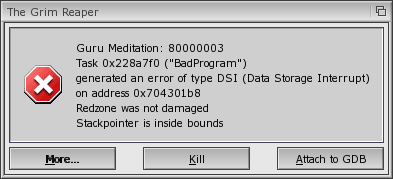
Last edited by ThePCKid (2010-01-03 12:48:15)
Offline
#9 2010-01-03 12:53:39
Re: Failed: Serialization: Message not understood: scalePoint
-Script area becomes red
-All of the sprites' names are "StringMorph"
-The textbox that you can edit the sprites' name with says "no object"
-All of the sprites are selected
-White box in the corner
-Nothing is selected in the block pallet
-The sprites aren't showing on the stage
Offline
#10 2010-01-23 11:52:42

Offline