Scratch
archived forums
#78 2009-10-21 12:17:12
- RHY3756547
- Scratcher
- Registered: 2009-08-15
- Posts: 1000+
Re: Hellish Haggis Team - Scratch Olympics
Comment predictions:
No scrolling = "Yaaaaaaay I can play it online!  "
"
Scrolling = "IT'S SO SLOW! D:"
I say we go with multiple level no-scrolling.
Offline
#79 2009-10-21 12:24:03
Re: Hellish Haggis Team - Scratch Olympics
RHY3756547 wrote:
Comment predictions:
No scrolling = "Yaaaaaaay I can play it online!
Scrolling = "IT'S SO SLOW! D:"
I say we go with multiple level no-scrolling.
Should we have each level 480*360 using only one background, or 1 big level which changes background when you are at the edges.

Offline
#80 2009-10-21 12:44:22
- RHY3756547
- Scratcher
- Registered: 2009-08-15
- Posts: 1000+
Re: Hellish Haggis Team - Scratch Olympics
jacool wrote:
RHY3756547 wrote:
Comment predictions:
No scrolling = "Yaaaaaaay I can play it online!
Scrolling = "IT'S SO SLOW! D:"
I say we go with multiple level no-scrolling.Should we have each level 480*360 using only one background, or 1 big level which changes background when you are at the edges.
Dunno - It'd be VERY hard to do offscreen Zombie AI so they cross over bks etc.
Offline
#81 2009-10-21 12:52:43
Re: Hellish Haggis Team - Scratch Olympics
RHY3756547 wrote:
jacool wrote:
RHY3756547 wrote:
Comment predictions:
No scrolling = "Yaaaaaaay I can play it online!
Scrolling = "IT'S SO SLOW! D:"
I say we go with multiple level no-scrolling.Should we have each level 480*360 using only one background, or 1 big level which changes background when you are at the edges.
Dunno - It'd be VERY hard to do offscreen Zombie AI so they cross over bks etc.
Yeah, I didn't think about that, let's just make one background per each level.
To make the Zombies go over to the next level is quite easy, but it will make it laggier 
Offline
#83 2009-10-21 14:31:54
- RHY3756547
- Scratcher
- Registered: 2009-08-15
- Posts: 1000+
Re: Hellish Haggis Team - Scratch Olympics
jacool wrote:
Here's the finished (maybe I'll add more things to it) level creator:
http://www.mediafire.com/?sharekey=63a9f67300e4ea876e7203eb87368129e04e75f6e8ebb871
It's actually quite fun to play around with
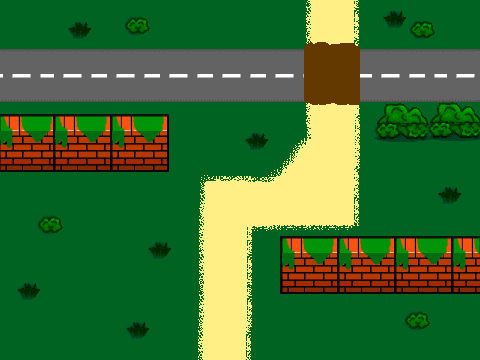
Great! I downloaded the code and added rounding scripts for all the different costumes and a flipped wall image (vertical and horizontal). Here's what I made from it:
Should I upload the improved level creator?
Offline
#84 2009-10-21 14:32:59
Re: Hellish Haggis Team - Scratch Olympics
RHY3756547 wrote:
jacool wrote:
Here's the finished (maybe I'll add more things to it) level creator:
http://www.mediafire.com/?sharekey=63a9f67300e4ea876e7203eb87368129e04e75f6e8ebb871
It's actually quite fun to play around withGreat! I downloaded the code and added rounding scripts for all the different costumes and a flipped wall image (vertical and horizontal). Here's what I made from it:
http://i364.photobucket.com/albums/oo85 … utpost.gif
Should I upload the improved level creator?
Yes, please do 
Nice level BTW
WAIT before you upload it we need to fix one thing, when you're clicking the red stop button it stamps anyway.
Last edited by jacool (2009-10-21 14:34:29)
Offline
#85 2009-10-21 14:39:01
- RHY3756547
- Scratcher
- Registered: 2009-08-15
- Posts: 1000+
Re: Hellish Haggis Team - Scratch Olympics
Uploaded here.
Offline
#86 2009-10-21 14:46:15
- RHY3756547
- Scratcher
- Registered: 2009-08-15
- Posts: 1000+
Re: Hellish Haggis Team - Scratch Olympics
Just updated the sand texture.
Offline
#89 2009-10-21 15:40:27
- RHY3756547
- Scratcher
- Registered: 2009-08-15
- Posts: 1000+
Re: Hellish Haggis Team - Scratch Olympics
Don't we have to make a function that switches between collision mode and Graphic mode? Like make all the Things Black with a white background so you can change the white into transparent, which you could then use as a collision map for the Character and Zombies?
Offline
#91 2009-10-21 15:56:25
- RHY3756547
- Scratcher
- Registered: 2009-08-15
- Posts: 1000+
Re: Hellish Haggis Team - Scratch Olympics
jacool wrote:
Ok, and we have to wait for The-Whiz to make the base for the character.
I wonder how that's come on...
Offline
#92 2009-10-21 17:07:07
- Lucario621
- Community Moderator
- Registered: 2007-10-03
- Posts: 1000+
Re: Hellish Haggis Team - Scratch Olympics
Coooool stuff I like the levels you guys made.

Offline
#93 2009-10-21 17:33:53
- RHY3756547
- Scratcher
- Registered: 2009-08-15
- Posts: 1000+
Re: Hellish Haggis Team - Scratch Olympics
Lucario621 wrote:
Coooool stuff
Thanks! We'll have the real game up by halloween. 
Where are The-Whiz and Greenflash?
Offline
#94 2009-10-21 20:31:06
- Lucario621
- Community Moderator
- Registered: 2007-10-03
- Posts: 1000+
Re: Hellish Haggis Team - Scratch Olympics
Hmm...one thing I noticed. I see theres the ability to rotate your block or piece or wall or whatever by using the arrow keys, but as far as it looks, it doesn't actually record it in the scripts. Maybe want to fix this?
Offline
#95 2009-10-22 01:00:01
- greenflash
- Scratcher
- Registered: 2009-05-27
- Posts: 1000+
Re: Hellish Haggis Team - Scratch Olympics
Here is a tree sprite:
and a level
Last edited by greenflash (2009-10-22 01:10:27)


Offline
#96 2009-10-22 03:16:47
- RHY3756547
- Scratcher
- Registered: 2009-08-15
- Posts: 1000+
Re: Hellish Haggis Team - Scratch Olympics
greenflash wrote:
Here is a tree sprite:
http://i37.tinypic.com/2570v1x.jpg
and a level
http://i35.tinypic.com/kdpehf.jpg
Great, I'll add it into the editor. After some final features we have to start on the game. (which, assumingly The-Whiz has.)
Offline
#97 2009-10-22 10:59:30
Re: Hellish Haggis Team - Scratch Olympics
I just wanted to point out that the big bush kinda looks like a face
 The rules of the internet:
1) Every woman is a man 2) Every man is a child 3) Every child is an FBI agent I have psychopathic tendencies. Be afraid
Offline
#98 2009-10-22 11:08:58
- RHY3756547
- Scratcher
- Registered: 2009-08-15
- Posts: 1000+
Re: Hellish Haggis Team - Scratch Olympics
Mr_X wrote:
I just wanted to point out that the big bush kinda looks like a face
Yeah - I made the bushes happy.
Offline
#99 2009-10-22 11:13:24
Re: Hellish Haggis Team - Scratch Olympics
Lucario621 wrote:
Hmm...one thing I noticed. I see theres the ability to rotate your block or piece or wall or whatever by using the arrow keys, but as far as it looks, it doesn't actually record it in the scripts. Maybe want to fix this?
Well at first I were going to use the lists, but we aren't going to do that anymore.
Offline
#100 2009-10-22 11:15:37
- RHY3756547
- Scratcher
- Registered: 2009-08-15
- Posts: 1000+
Re: Hellish Haggis Team - Scratch Olympics
jacool wrote:
Lucario621 wrote:
Hmm...one thing I noticed. I see theres the ability to rotate your block or piece or wall or whatever by using the arrow keys, but as far as it looks, it doesn't actually record it in the scripts. Maybe want to fix this?
Well at first I were going to use the lists, but we aren't going to do that anymore.
Err - we need to.
We need to press a button so it re-prints the level as a collision map. Are you working on the level editor atm Jacool? I need to add collision functionality to the code, so I need the latest code.
Offline