Scratch
archived forums
#51 2012-09-11 23:13:35
Re: Report bugs and Glitches in the *New* Flash player here!
Thanks for all the helpful bug reports!
Player updated! If you go to a project page w/ flash player, open your console (F12 on Chrome, click "console") and reload, you should see "version 149" now. If not, clear your cache.
Changes:
- disappearing full-screen button and top-bar size issues
- can't get into edit mode (Sorry everyone. We don't want people sharing projects that you can't download and open on Scratch 1.4)
- some of the performance issues addressed (If you reported laggyness upthread here, please test and let us know if it's fixed!)
Help Scratchers make the leap to 2.0!

Offline
#53 2012-09-12 00:42:10
Re: Report bugs and Glitches in the *New* Flash player here!
OS: Mac OSX 10.8.1 (but the problem seem to cover all platforms)
Browser: Safari 6.0 (and Internet Exploroer 7)
Flash version: 11.4.402.265
Examples of the problem:
http://scratch.mit.edu/projects/Yllie/2580576 http://scratch.mit.edu/projects/Yllie/1976643
I found a very serious glitch in the new flash player. When running some of my games the menus in the game disappear, like in Blue Box 2 (2nd link) the buttons first slides in from the edges and then they are supposed to stop in the middle. However, in the new flash player they slide in and then quickly slides back again.
I have not noticed this problem on any other scratchers game so far but it happens on several of my own. I noticed this problem already when when I was trying Scratch 2.0 Beta. Please take a look at it as it makes my games worthless and unable to play. 
/Yllie
"If there is something you really really want to do, the only thing stoping you is your own fear of failure"
Offline
#54 2012-09-12 01:11:34
Re: Report bugs and Glitches in the *New* Flash player here!
Lightnin wrote:
Thanks for all the helpful bug reports!
Player updated!
It's getting worse, not better.
None of the issues I pointed out on page 1 of this thread have been addressed and the player seems slower now than before.
Here's some more stuff: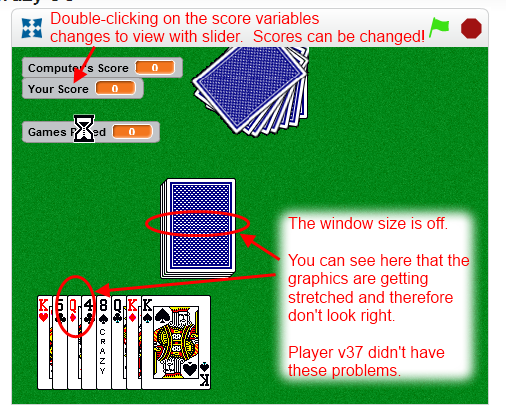
This is how a project looks while it is loading:
The above is the screen I see when using IE9 on Windows 7.
And, this is what happens when I press the full-screen button on IE9: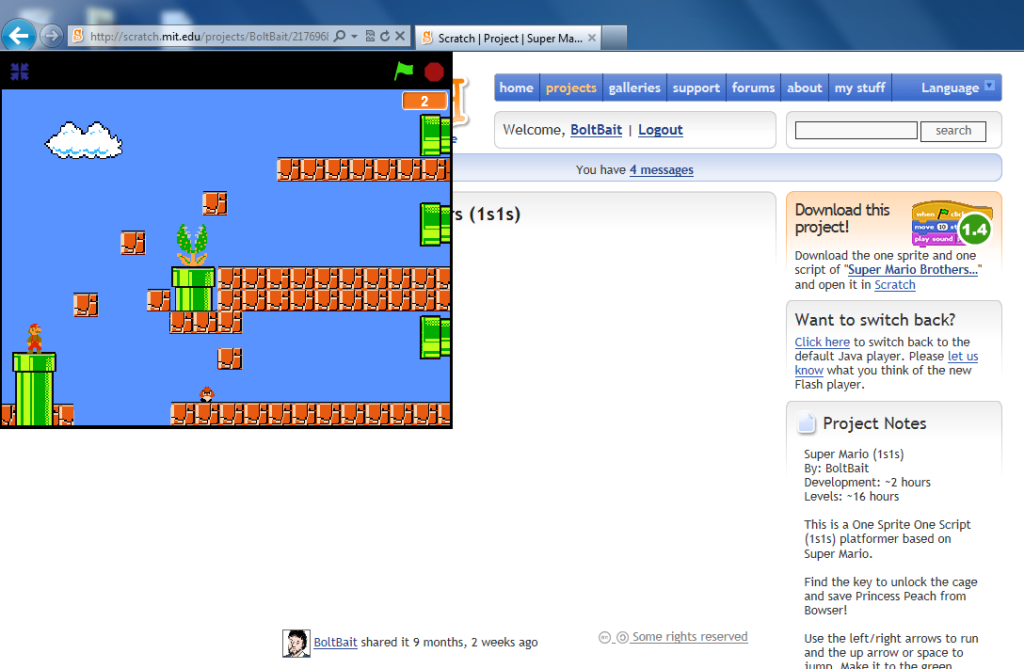
I'm so glad that I finally grabbed v37 of the flash player last week for hosting games on my own web site. Now that I've got that working on my own site, I'm happy. I just hope you get things together on the main Scratch site.
BTW, how do we see the player version if it not shown on the flag bar anymore?
Last edited by BoltBait (2012-09-12 01:39:30)
Animated sigs must be banned!





Offline


#56 2012-09-12 06:12:34
Re: Report bugs and Glitches in the *New* Flash player here!
MathWizz wrote:
Lightnin wrote:
- can't get into edit mode (Sorry everyone. We don't want people sharing projects that
Disappointing really. I could get around this in so many ways too.

I was impressed that you figured out how to get into edit mode so fast! Sorry about disabling it for now, but it's not quite ready. In the next few months there will be opportunities for people to help us test Scratch 2.0. Stay tuned!
Offline
#57 2012-09-12 06:17:10
Re: Report bugs and Glitches in the *New* Flash player here!
Kenichi10 wrote:
The game itself is resized. It's not 480 x 360 pixels. Because of this, it's resized, making text look weird.
Good analysis! I've noticed that the text in many projects doesn't look good if your browser is zoomed even slightly in or out. For those projects, you can either set your browser to "actual size" or use the "full screen" button. (My browser has an "Actual size" command in the view menu.)
Offline
#59 2012-09-12 06:25:36
Re: Report bugs and Glitches in the *New* Flash player here!
BoltBait wrote:
It's getting worse, not better.
None of the issues I pointed out on page 1 of this thread have been addressed and the player seems slower now than before.
...
BTW, how do we see the player version if it not shown on the flag bar anymore?
Your bug reports are very helpful. However, it takes time to find and fix bugs. In some cases, a bug only shows up on certain browsers or OS's, and It's difficult to fix a bug until you can reproduce it. (For example the cut-off text in variable monitors bug doesn't show up in any of my browsers. I think it's probably specific to Windows, but I haven't had a chance to verify that.)
The version number is now printed in the JavaScript console; less visual clutter.
Thanks again for the great bug reports and please be patient.
Last edited by johnadmin (2012-09-12 12:13:33)
Offline
#60 2012-09-12 06:27:36
Re: Report bugs and Glitches in the *New* Flash player here!
jontmy00 wrote:
@BoltBait: I had that problem with the Beta Flash Player, with the exact same browser and OS.
In case you didn't see it. 
[Edit from johnm: Sounds like the problem(s) may be browser/OS dependent. Thanks!]
Last edited by johnadmin (2012-09-12 12:12:27)
FOR ALL THE NEWS ON UPDATES FOR SIMPLISTICRAFT, CLICK HERE.
Offline
#61 2012-09-12 12:53:33
Re: Report bugs and Glitches in the *New* Flash player here!
johnadmin wrote:
Your bug reports are very helpful. However, it takes time to find and fix bugs.
Sorry, didn't mean to come off as impatient.
OK, just noticed another issue: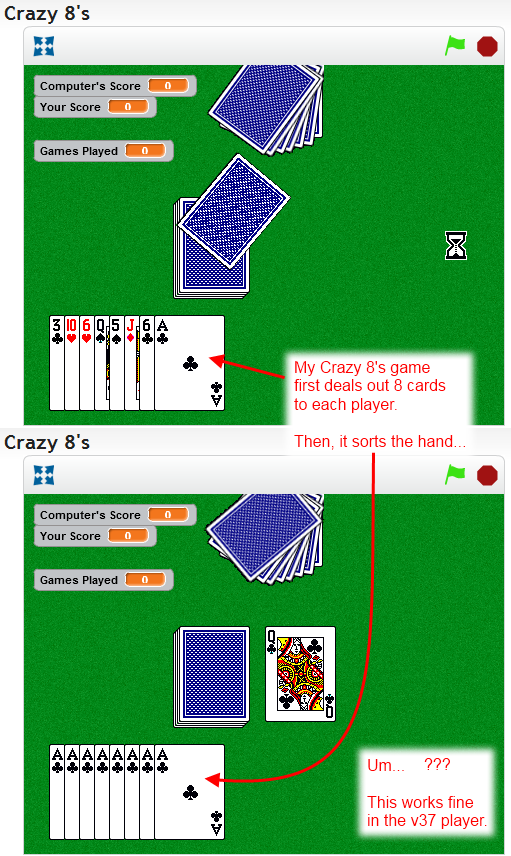
EDIT: Looks like my script is missing a "Show" before the "Stamp". That may be the problem. Interesting that it worked before.
Last edited by BoltBait (2012-09-12 13:08:19)
Animated sigs must be banned!
Offline
#62 2012-09-12 12:56:11
#63 2012-09-12 18:08:22
Re: Report bugs and Glitches in the *New* Flash player here!
Thanks for the reports everyone! Player updated to v150
- added an "oldWebsite" flag to suppress embedMode (which caused full-screen buttton to disappear) and disable "setEditMode"
- bug: performance issue with color touching
- bug: flickering full-screen button
- bug: incorrect mapping of old->new midi instruments
- bug: in old project conversion (taddl/2771043, 'the run 1.0.4'; had a SensorBoardMorph on stage)
- bug: disallow switching variable monitor modes in player mode
- bug: scissors could delete blocks from palette
Help Scratchers make the leap to 2.0!
Offline
#64 2012-09-12 18:11:42
Re: Report bugs and Glitches in the *New* Flash player here!
BoltBait wrote:
johnadmin wrote:
Your bug reports are very helpful. However, it takes time to find and fix bugs.
Sorry, didn't mean to come off as impatient.
OK, just noticed another issue:
http://i57.photobucket.com/albums/g228/ … hBugs6.png
EDIT: Looks like my script is missing a "Show" before the "Stamp". That may be the problem. Interesting that it worked before.
First of BoltBait: You make awesome bug reports. Everyone: please make bug reports like BoltBait!
2nd - John might have to correct me, but I believe we're fixing an error in the old implementation, which used to stamp an unghosted / hidden sprite as if it weren't ghosted / hidden. This is different than the way stamp works for all other graphic effects. i.e. if you stamp a "whirled" sprite, the stamp looks like the whirled sprite. So we decided to be consistent, but this may break some old projects that depended on the old "buggy" implementation.
Hope that helps explain stuff.
Help Scratchers make the leap to 2.0!
Offline
#65 2012-09-12 18:15:44
Re: Report bugs and Glitches in the *New* Flash player here!
Thanks.
I'm happy to see some progress on the player today. 
If that is the case, then the bug on that last one is completely mine. I'll be sure to add the "show" before the stamp. That was my intent.
EDIT:
And, thank you very much for posting your change log each release. That helps us figure out which bugs we should be retesting.
Last edited by BoltBait (2012-09-12 18:17:36)
Animated sigs must be banned!
Offline
#66 2012-09-12 18:33:46
Re: Report bugs and Glitches in the *New* Flash player here!
Some edges of sprites and shown data (variables, lists, etc.) are slightly cut off. Also, many projects run a lot slower than before, likely due to the amount of sprites/costumes present at a given point in a project. Both examples can be found here: http://scratch.mit.edu/projects/gamer2012TEST/2757750. You can compare the speed differences with Classic Mode and Arcade Mode, which was not a problem in the beta flash player.
Last edited by gamer2012 (2012-09-12 18:35:38)
Coming soon: Nothing much 'till Scratch 2.0. Oh, here's one of my classics!
Square Quest: (You BETTER click here!!! XD)Offline
#67 2012-09-12 18:52:15
Re: Report bugs and Glitches in the *New* Flash player here!
I apologize in advance for fooling around in edit mode.
as you can see, if a variable name contains %b or %n, it transforms the entire variable reporter into whatever the code refers to in the squeak thing. I assume the glitch is present for %l as well.
Hopefully you didn't know about this, as I dont want to come off as being pretentious by reporting something you already know exists that i wasn't even supposed to be seeing in the first place.
Experienced 2.0 Tester: Ask me questions!
Using Firefox 13.0, Flash plugin version 11.4.402.287, and Windows XP Professional.
Offline
#68 2012-09-12 18:59:04
Re: Report bugs and Glitches in the *New* Flash player here!
Sorry in advance again for double posting, but this is new stuff.
1 - The center of whirling is still different from full-screen mode to normal mode.
2 - The string data is greater than numbers glitch still exists.
3 - Inexplicable sprite jittering. Multiple sprites in this project suddeny began jittering about by 1 or 2 pixels, in any given direction. It happened for multiple, unrelated sprites and the stamped background. It may occur again if you play the game for 1 round and allow an asteroid to strike the earth. No programming in this game is designed to or could possible cause this jittering, as I bugtested and played it many times in the past.
this post will be updated with mode
Last edited by Wes64 (2012-09-12 19:05:49)
Experienced 2.0 Tester: Ask me questions!
Using Firefox 13.0, Flash plugin version 11.4.402.287, and Windows XP Professional.
Offline
#69 2012-09-12 19:27:33
- jackajacka
- Scratcher
- Registered: 2012-05-11
- Posts: 57
Re: Report bugs and Glitches in the *New* Flash player here!
I fonnd that in my game RAZOR and RAZOR 2, there is a little line inbetween the scrolling sprites. This didn't happen in the old flash player. Is it because of the changes of screen size? Thanks for looking.

Offline
#70 2012-09-12 22:30:47
- TorbyFork234
- Scratcher
- Registered: 2012-03-01
- Posts: 1000+
Re: Report bugs and Glitches in the *New* Flash player here!
Sprites randomly change costumes sometimes.
Offline
#71 2012-09-12 23:01:21
- veggieman001
- Scratcher
- Registered: 2010-02-20
- Posts: 1000+
Re: Report bugs and Glitches in the *New* Flash player here!
Wes64 wrote:
I apologize in advance for fooling around in edit mode.
http://i48.tinypic.com/2hzqydz.jpg
as you can see, if a variable name contains %b or %n, it transforms the entire variable reporter into whatever the code refers to in the squeak thing. I assume the glitch is present for %l as well.
Hopefully you didn't know about this, as I dont want to come off as being pretentious by reporting something you already know exists that i wasn't even supposed to be seeing in the first place.
I can confirm this bug happens with %n, %b, and %s when creating them in the alpha editor.
Posts: 20000 - Show all posts
Offline
#73 2012-09-13 12:01:27
Re: Report bugs and Glitches in the *New* Flash player here!
veggieman001 wrote:
Wes64 wrote:
I apologize in advance for fooling around in edit mode.
http://i48.tinypic.com/2hzqydz.jpg
as you can see, if a variable name contains %b or %n, it transforms the entire variable reporter into whatever the code refers to in the squeak thing. I assume the glitch is present for %l as well.
Hopefully you didn't know about this, as I dont want to come off as being pretentious by reporting something you already know exists that i wasn't even supposed to be seeing in the first place.I can confirm this bug happens with %n, %b, and %s when creating them in the alpha editor.
As can I. To bad we can't do that in 1.4
[edit 1] %c also works to.
[edit 2] as does %m
Last edited by zubblewu (2012-09-13 12:04:04)
........................................................................................................................................................................................................................................
Offline
#74 2012-09-13 13:51:53
Re: Report bugs and Glitches in the *New* Flash player here!
Lightnin wrote:
BoltBait wrote:
OK, just noticed another issue:
http://i57.photobucket.com/albums/g228/ … hBugs6.png
EDIT: Looks like my script is missing a "Show" before the "Stamp". That may be the problem. Interesting that it worked before.John might have to correct me, but I believe we're fixing an error in the old implementation, which used to stamp an unghosted / hidden sprite as if it weren't ghosted / hidden. This is different than the way stamp works for all other graphic effects. i.e. if you stamp a "whirled" sprite, the stamp looks like the whirled sprite. So we decided to be consistent, but this may break some old projects that depended on the old "buggy" implementation.
Hope that helps explain stuff.
That was the problem. I added the "Show" before the "Stamp" and everything's working fine on that project.
Animated sigs must be banned!
Offline
#75 2012-09-13 15:06:53
- jackajacka
- Scratcher
- Registered: 2012-05-11
- Posts: 57
Re: Report bugs and Glitches in the *New* Flash player here!
Some of my games are unplayable now with this new flash player. I liked the old size, the new size screws up my characters, and again, somethings and now unplayable. For example, this. Also some of my 1s1s games, like this don't work too. The background shakes, when I am telling it to go to 0, 0. Please help!
Thanks!
Offline