Scratch
archived forums
#1 2012-04-12 11:11:03
How to use HTML/XHTML
Introduction
If your interested in creating a website, chances are that you will probably see the terms HTML, XHTML, CSS, JavaScript, and Flash tossed around a lot. Maybe your friends talk about there Myspace, blogger, or Facebook. But before you dive right into those websites, you probably want to think if you want your website to be professional. For example, you probably want to use Adobe Dreamweaver, or Microsoft Expression Web.
However, unless you are a professional Web designer, you might be unsure of figuring out where to start. You have to know which ones can be left to the techie-group crowd. What's more, you need to know the least amount of information you need to have a decent Web site.
While reading this topic, you may occasionally need to dig into the code of your Web page and understand what's going on behind the curtain. However, when possible, you'll probably want to use Dreamweaver or Expression Web to handle most of that lower-level coding for you.
So lets get started:
HTML/XHTML
So you want you site to be professional, but easy. First you have to add text and links to your webpage.
Making a paragraph
The p element is used to contain a paragraph of text. The opening tag <p> is placed at the beginning of the paragraph, and the closing tag </p> serves as a caboose. Here is an example of what that would look like:
Code:
<p>Put words here</p>
<p>Put more words here</p>
On the website, it will look like this:
Put words here
Put more words here
Adding a line break
The br element serves as a way to end a line manually or create an empty line of text. It's equivalent of pressing Enter in you e-mail message or word processing document and starting a new line.
The br element forces a new line when it's used and does not add space around other paragraphs.
This is the code:
Code:
<p>Put a bunch of interesting words here,"<br/>
That is what I said<br/>
Put more interesting words here</p>
This is what it will look like on the website:
Put a bunch of interesting words here
That is what I said
Put more interesting words here
Making a heading
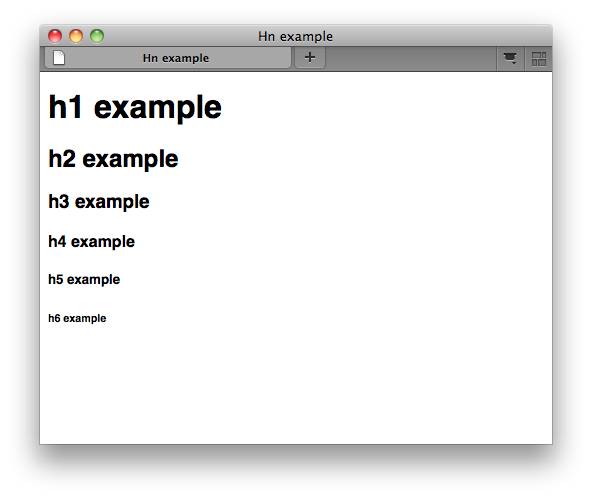
Most Web pages have a paragraph or groups of paragraphs offset by the headings. HTML supports six levels of headings with the h1, h2, h3, h4, h5, and h6 elements. The h1 element is the topmost and largest; the h6 is the smallest heading. Here are some examples.
Code:
<h1>This will be the biggest heading</h1>
<h2>This is smaller then the heading above</h2>
<h3>This is smaller then the heading above</h3>
<h4>This is smaller then the heading above</h4>
<h5>This is smaller then the heading above</h5>
<h6>This is the smallest heading</h6>
This is what it will look like on the website:
http://www.w3.org/wiki/images/4/44/Tr_hn01.png
Making text bold and Italic
Whether the Web site you're creating is mega huge or teeny-weeny, your most common formatting task is emphasizing text with bold and italics. This section describes the two elements you use for adding these two popular text effects.
Bolding text
Use the strong element when you want to Strongly emphasize a portion of
text. Here is an example of how to use strong text.
Code:
<p>Put cool words here and <strong>this text</strong> will be bold</p>
It will look like this on the website:
Put cool words here and this text will be bold
Italicizing text
The em element is used when you want to emphasize your text with italics.
The rest of this is under construction. Thanks for your time.
_____________________________________________________________________________________
Some other tips and trick from you:
jvvg wrote:
You should also add a DOCTYPE at the beginning of the document.
In HTML5, the doctype isCode:
<!DOCTYPE html>In XHTML 1.0 Transitional (the most common), use
Code:
<!DOCTYPE html PUBLIC "-//W3C//DTD XHTML 1.0 Transitional//EN" "http://www.w3.org/TR/xhtml1/DTD/xhtml1-transitional.dtd">and then
Code:
<html xmlns="http://www.w3.org/1999/xhtml">
scimonster wrote:
You know, you can use the B and I tags for bold and italics too.

Last edited by joletole (2012-04-12 11:48:13)
Offline
#2 2012-04-12 11:20:42
- scimonster
- Community Moderator
- Registered: 2010-06-13
- Posts: 1000+
Re: How to use HTML/XHTML
Nice guide to HTML! You know, you can use the B and I tags for bold and italics too.
Last edited by scimonster (2012-04-12 11:20:55)
 Moderator | Scratch Wiki Administrator | Coders' Shed Administrator
Scratch 2.0 is just around the corner! Prepare for the transition by beta testing. Your feedback will help make it the best it can be!
Offline
#3 2012-04-12 11:35:55
Re: How to use HTML/XHTML
You should also add a DOCTYPE at the beginning of the document.
In HTML5, the doctype is
Code:
<!DOCTYPE html>
In XHTML 1.0 Transitional (the most common), use
Code:
<!DOCTYPE html PUBLIC "-//W3C//DTD XHTML 1.0 Transitional//EN" "http://www.w3.org/TR/xhtml1/DTD/xhtml1-transitional.dtd">
and then
Code:
<html xmlns="http://www.w3.org/1999/xhtml">
Goodbye, Scratch 1.4
 Hello Scratch 2.0!
 Offline
#4 2012-04-12 19:40:05
Re: How to use HTML/XHTML
Bump
Offline

#7 2012-04-13 07:32:14
- BrynnaeBroghan
- New Scratcher
- Registered: 2012-04-11
- Posts: 8
Re: How to use HTML/XHTML
HTML is one of the easiest and fastest language to develop a website and is the base language in which website is to be translated. Thanks for sharing good post. I like it.
Offline
#8 2012-04-13 08:18:52
Re: How to use HTML/XHTML
Both guides (joletole's and trinary's) are very good, but if I were a newbie in HTML I think I would have a hard time understanding it.
In my humble opinion, both tutorials lack a beginning bit that actually explains how HTML works, how it's structured, and what the ideas behind it are. It's kind of difficult to jump-start directly into a Notepad document with pre-made markup.
Wouldn't it be better to first explain the triangle bracket structure, the < and >, how there are opening tags and closing tags with /, and the idea behind tags, attributes and values?


Offline
#9 2012-04-13 08:35:10
- ProgrammingFreak
- Scratcher
- Registered: 2010-09-04
- Posts: 1000+
Re: How to use HTML/XHTML
LS97 wrote:
Both guides (joletole's and trinary's) are very good, but if I were a newbie in HTML I think I would have a hard time understanding it.
In my humble opinion, both tutorials lack a beginning bit that actually explains how HTML works, how it's structured, and what the ideas behind it are. It's kind of difficult to jump-start directly into a Notepad document with pre-made markup.
Wouldn't it be better to first explain the triangle bracket structure, the < and >, how there are opening tags and closing tags with /, and the idea behind tags, attributes and values?
Yeah, these seem to be more like 'reference guides' than actual tutorials for beginners.
Both are very good, but I agree with Ls, I'm not sure if beginners would understand it.

Offline
#10 2012-04-13 18:23:28
Re: How to use HTML/XHTML
ProgrammingFreak wrote:
LS97 wrote:
Both guides (joletole's and trinary's) are very good, but if I were a newbie in HTML I think I would have a hard time understanding it.
In my humble opinion, both tutorials lack a beginning bit that actually explains how HTML works, how it's structured, and what the ideas behind it are. It's kind of difficult to jump-start directly into a Notepad document with pre-made markup.
Wouldn't it be better to first explain the triangle bracket structure, the < and >, how there are opening tags and closing tags with /, and the idea behind tags, attributes and values?Yeah, these seem to be more like 'reference guides' than actual tutorials for beginners.
Both are very good, but I agree with Ls, I'm not sure if beginners would understand it.
Thats why it is in the Advanced Section.
Offline
#11 2012-04-13 18:51:18
- MoreGamesNow
- Scratcher
- Registered: 2009-10-12
- Posts: 1000+
Re: How to use HTML/XHTML
joletole wrote:
ProgrammingFreak wrote:
Yeah, these seem to be more like 'reference guides' than actual tutorials for beginners.
Both are very good, but I agree with Ls, I'm not sure if beginners would understand it.Thats why it is in the Advanced Section.
As a "how to" it seems like a tutorial more than a reference guide. Regardless of whether it is in "Advanced Topics", the title implies it is a tutorial. If it is supposed to be a reference guide, the title should reflect that

"Cogito ergo sum" -- I think, therefore I am
Offline