Scratch
archived forums
#1 2012-02-17 14:42:02
What Just Happened?!?
What just happened? Scratch's Flash Player no longer works in IE9. It was just working seconds ago. (P.S. This has happened to me before. I couldn't view projects in Scratch's Flash Player for months! Scratch's Flash had just started to work in IE 9 about a month ago...)
*Sigh* back to java...
Just incase you're wondering, this is what it looks like for me in flash when I put my cursor over my project (by the way, I DO have Adobe Flash) I will try to update Adobe Flash:
http://i43.tinypic.com/ztgec8.jpg
And now ALL posts with scratchblocks look like this!
http://i41.tinypic.com/jgibgi.jpg
Last edited by ads98 (2012-02-17 15:04:25)
Offline
#2 2012-02-17 14:53:02
- stevetheipad
- Scratcher
- Registered: 2011-08-06
- Posts: 1000+
Re: What Just Happened?!?
Are you sure to have the latest version of flash player?

gone
Offline
#3 2012-02-17 14:56:19
- rabbit1131
- Scratcher
- Registered: 2009-10-16
- Posts: 1000+
Re: What Just Happened?!?
Well, internet explorer isn't really the best browser to use on things like this, maybe you could try Chrome?
The Intergalactic Adventures of Revesilia! I hope you will partake in this gigantic undertaking, to build the sequel to the hit map The Adventures of Revesilia! The Intergalactic Adventures of Revesilia Map Builders Application thread!

Offline
#4 2012-02-17 14:56:20
- ProgramCAT
- Scratcher
- Registered: 2011-12-13
- Posts: 500+
Re: What Just Happened?!?
Download and install Flash Player 10. That should fix it...
Programming is an art...
Goodbye, Scratch. I am leaving because of the exams coming up at our school, though I'll check the forums once or twice a week.
Offline
#5 2012-02-17 14:56:30
Re: What Just Happened?!?
stevetheipad wrote:
Are you sure to have the latest version of flash player?
Well, assuming that all scratch projects I viewed in the scratch flash player were playing perfectly fine about 15 minutes ago, yes. But I will update it just to be on the safe side.
I don't know how many times I'm going to say this, but I've had this same problem before (it lasted for months). It just got fixed about a month ago.
Last edited by ads98 (2012-02-17 15:07:17)
Offline

#7 2012-02-17 14:57:31
- ProgramCAT
- Scratcher
- Registered: 2011-12-13
- Posts: 500+
Re: What Just Happened?!?
Or try Google Chrome. It works in that browser.
Programming is an art...
Goodbye, Scratch. I am leaving because of the exams coming up at our school, though I'll check the forums once or twice a week.
Offline
#8 2012-02-17 14:59:08
Re: What Just Happened?!?
rabbit1131 wrote:
Well, internet explorer isn't really the best browser to use on things like this, maybe you could try Chrome?
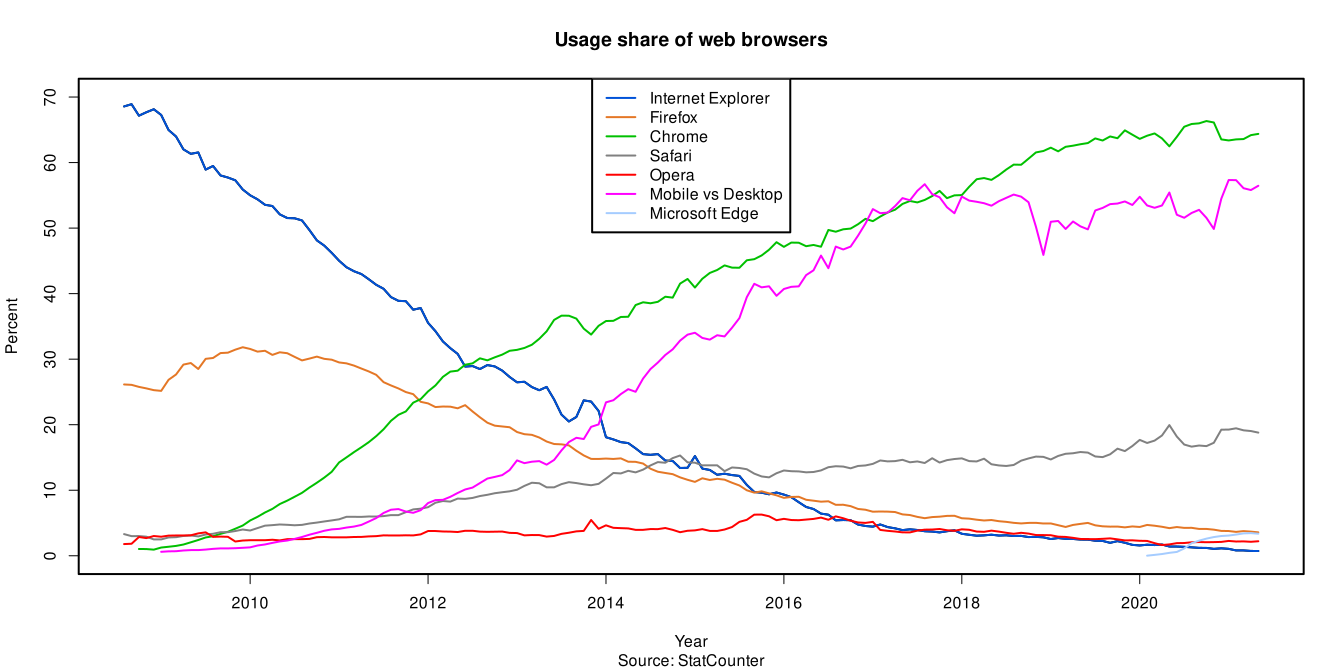
Dude, look at this graph. Now are you telling me that scratch.mit.edu (which was created by MIT) WOULDN'T make their flash player compatible with IE (9)? Because I can go to youtube, and watch videos with no problem...
Last edited by ads98 (2012-02-17 15:02:38)
Offline
#9 2012-02-17 14:59:34
- Zeusking19
- Scratcher
- Registered: 2011-07-10
- Posts: 1000+
Re: What Just Happened?!?
If your on x64(64 bit) hardware, then it will most likely not work, since the x64 version of flash is not fully compatible with IE. Even though the feature is there, there will be bugs and stop working. If in doubt, reinstall flash.
Alternatively, I suggest you switch to Opera, Firefox or chrome.
Last edited by Zeusking19 (2012-02-17 15:03:12)


Offline
#10 2012-02-17 15:01:16
Re: What Just Happened?!?
Zeusking19 wrote:
If your on x64(64 bit) hardware, then it will most likely not work, since the x64 version is not fully compatible with IE.
I suggest you switch to Opera, Firefox or chrome.
I am on x64. So you're saying x64 Flash on x64MICROSOFT Windows 7 is not FULLY compatible with IE 9. (I'm not mocking you, I'm just really suprised.)
Last edited by ads98 (2012-02-17 15:12:09)
Offline
#11 2012-02-17 15:02:08
- Zeusking19
- Scratcher
- Registered: 2011-07-10
- Posts: 1000+
Re: What Just Happened?!?
ads98 wrote:
Zeusking19 wrote:
If your on x64(64 bit) hardware, then it will most likely not work, since the x64 version is not fully compatible with IE.
I suggest you switch to Opera, Firefox or chrome.I am on x64. So you're saying x64 MICROSOFT Windows 7 is not FULLY compatible with IE 9. (I'm not mocking you, I'm just really suprised.)
No. Flash is not fully compatible with x64 IE.
Offline
#12 2012-02-17 15:06:14
Re: What Just Happened?!?
Guys, the reason I think this is a scratch website problem is because scratchblocks has NOTHING to do with adobe flash, and it's messed up.
Ads98 wrote:
And now ALL posts with scratchblocks look like this!http://i41.tinypic.com/jgibgi.jpg
Last edited by ads98 (2012-02-17 15:12:34)
Offline
#13 2012-02-17 15:09:03
Re: What Just Happened?!?
TRocket wrote:
same happens to me in IE fine in other browsers though
This problem NEEDS to be addressed. I bet over 30% of scratch users use IE. And it's only an IE problem. And it goes on and off (which is weird). I mean, you don't see sites like youtube.com having this problem (I do realise they probably have more people working on their site, correct me if I'm wrong...)
Last edited by ads98 (2012-02-17 15:09:27)
Offline
#14 2012-02-17 15:19:06
Re: What Just Happened?!?
ads98 wrote:
Guys, the reason I think this is a scratch website problem is because scratchblocks has NOTHING to do with adobe flash, and it's messed up.
Ads98 wrote:
And now ALL posts with scratchblocks look like this!http://i41.tinypic.com/jgibgi.jpg
that I've had before just clean your browser cache
SCRATCH'S PARTLY INSANE RESIDENT

Offline
#15 2012-02-17 15:22:55
Re: What Just Happened?!?
muppetds wrote:
ads98 wrote:
Guys, the reason I think this is a scratch website problem is because scratchblocks has NOTHING to do with adobe flash, and it's messed up.
Ads98 wrote:
And now ALL posts with scratchblocks look like this!http://i41.tinypic.com/jgibgi.jpg
that I've had before just clean your browser cache
Okay. That may also work with this.
Offline
#16 2012-02-17 15:31:28
- CheeseMunchy
- Scratcher
- Registered: 2008-10-13
- Posts: 1000+
Re: What Just Happened?!?
Weird.
Get a different web browser and see if it works. :\
6418,
Offline
#17 2012-02-17 16:01:13
Re: What Just Happened?!?
CheeseMunchy wrote:
Weird.
Get a different web browser and see if it works. :\
That's not the point. I'm pretty sure it would work if I got another browser, becuase people who are using chrome right don't have this problem. If I REALLY want to view a project in scratch flash 100% of the time, I'll just get one of those other browsers.
My question to scratch.mit.edu is this: why is this a problem only on your website? The reason why I don't think this is an x64 Flash/IE problem is I can go to multiple websites that primarily use flash, and I don't have this problem.
Last edited by ads98 (2012-02-17 16:02:28)
Offline
#18 2012-02-17 17:17:08
- maxskywalker
- Scratcher
- Registered: 2008-01-27
- Posts: 1000+
Re: What Just Happened?!?
I haven't read the replies yet, so I might be late in posting, but PLEASE hold the remarks about how horrible a so-called 'browser' IE is.



Offline
#19 2012-02-17 17:33:12
Re: What Just Happened?!?
maxskywalker wrote:
I haven't read the replies yet, so I might be late in posting, but PLEASE hold the remarks about how horrible a so-called 'browser' IE is.
I never said IE is horrible. In fact, I'm trying to defend IE by saying this is a scratch website problem. I mean, come on! I can't be the only IE user on here.
Like I said earlier, I think over 40% of the users on here use IE. The problem I'm having may only be reflected only on IE or on my computer, but I still believe this is NOT an IE/Flash x64 problem, so I agree what you're saying. I love IE (my favorite browser)!
Last edited by ads98 (2012-02-17 17:36:00)
Offline
#20 2012-02-17 17:54:49
- CheeseMunchy
- Scratcher
- Registered: 2008-10-13
- Posts: 1000+
Re: What Just Happened?!?
ads98 wrote:
CheeseMunchy wrote:
Weird.
Get a different web browser and see if it works. :\That's not the point. I'm pretty sure it would work if I got another browser, becuase people who are using chrome right don't have this problem. If I REALLY want to view a project in scratch flash 100% of the time, I'll just get one of those other browsers.
My question to scratch.mit.edu is this: why is this a problem only on your website? The reason why I don't think this is an x64 Flash/IE problem is I can go to multiple websites that primarily use flash, and I don't have this problem.
I don't mean you have to convert to a different browser but just to be sure it is in your browser and not something else you should make sure the same thing doesn't happen in another browser. :\
Last edited by CheeseMunchy (2012-02-17 17:56:08)
6418,
Offline
#21 2012-02-18 13:22:42
- scimonster
- Community Moderator
- Registered: 2010-06-13
- Posts: 1000+
Re: What Just Happened?!?
Did JavaScript get disabled?
 Moderator | Scratch Wiki Administrator | Coders' Shed Administrator
Scratch 2.0 is just around the corner! Prepare for the transition by beta testing. Your feedback will help make it the best it can be!
Offline
#23 2012-02-18 13:49:26
- scimonster
- Community Moderator
- Registered: 2010-06-13
- Posts: 1000+
Re: What Just Happened?!?
ads98 wrote:
scimonster wrote:
Did JavaScript get disabled?
I'm not sure....but how would that affect x64 Adobe Flash?
Because I think it starts playing with JS.
Moderator | Scratch Wiki Administrator | Coders' Shed AdministratorScratch 2.0 is just around the corner! Prepare for the transition by beta testing. Your feedback will help make it the best it can be!
Offline