Scratch
archived forums
#1 2010-12-04 14:18:11
- AtomicBawm3
- Scratcher
- Registered: 2009-06-27
- Posts: 1000+
Maze game on my Calculator
The first real game I've made on my calculator. Basically, it bases it's configuration off of a matrix that has only 1's and 0's in it. Based on those 1's and 0's, it shows you a 3d view of you position, where you can rotate by 90 degrees either direction and move forward one grid space if there's not a wall in front of you. It has a slight turn animation (which is really simple), and a overhead map you can look at that tells you what the maze looks like, where you are, and what direction you're pointing. I might even make it so it's multilevel. So anyway, I was wondering if any of you guys have ever made any games on your calculators or have beaten the games on them like Blockman and such.

Offline
#3 2010-12-04 14:24:32
- The_Dancing_Donut
- Scratcher
- Registered: 2010-08-03
- Posts: 1000+
Re: Maze game on my Calculator
Calculator as in those basic plastic rectangles with rubber buttons? Like this?

Offending strangers since 2010.
Offline
#4 2010-12-04 14:35:17
- AtomicBawm3
- Scratcher
- Registered: 2009-06-27
- Posts: 1000+
Re: Maze game on my Calculator
Yeah, but on a TI-83+, which is a graphing calculator. You can write programs on them and play games if you have them.
Offline
#5 2010-12-04 14:36:30
- meowmeow55
- Scratcher
- Registered: 2008-12-24
- Posts: 1000+
Re: Maze game on my Calculator
I think AtomicBawm3 is talking about graphing calculators, like this one: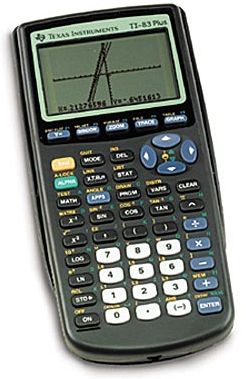
Edit: Outposted, but the image is still handy.
Last edited by meowmeow55 (2010-12-04 14:37:29)
Yawn.
Offline
#6 2010-12-04 14:37:40
Re: Maze game on my Calculator
meowmeow55 wrote:
I think AtomicBawm3 is talking about graphing calculators, like this one:
http://salestores.com/stores/images/ima … 83PLUS.jpg
Edit: Outposted, but the image is still handy.
AWESOME



Offline
#7 2010-12-04 14:40:08
Re: Maze game on my Calculator
Yes people, you can program on a calculator. A graphing/programmable calculator, to be exact. Those calculators are more like computers than a average dollar-store calculator.
Sadly, I don't have one, so I can't give details. 
Offline
#8 2010-12-04 14:53:22
- The_Dancing_Donut
- Scratcher
- Registered: 2010-08-03
- Posts: 1000+
Re: Maze game on my Calculator
fire219 wrote:
Yes people, you can program on a calculator. A graphing/programmable calculator, to be exact. Those calculators are more like computers than a average dollar-store calculator.
Sadly, I don't have one, so I can't give details.
Don't make fun of PoundWorld calculators!  Mine works, uh, well!
Where can you get these magical programmable calculators?
Offending strangers since 2010.
Offline
#9 2010-12-04 14:58:05
Re: Maze game on my Calculator
The_Dancing_Donut wrote:
fire219 wrote:
Yes people, you can program on a calculator. A graphing/programmable calculator, to be exact. Those calculators are more like computers than a average dollar-store calculator.
Sadly, I don't have one, so I can't give details.Don't make fun of PoundWorld calculators!
Where can you get these magical programmable calculators?
http://education.ti.com/educationportal … ti84p.html
They're pricey though.
Any chance of you uploading this game? I'd like to see it. I have my own maze game that uses matrices as well, but it's a bird's-eye view.

Offline
#10 2010-12-04 15:00:45
- Kileymeister
- Scratcher
- Registered: 2008-04-17
- Posts: 1000+
Re: Maze game on my Calculator
I have a TI-89, which contradictorily, seems less advanced than the 83's, 4's or 5's. Most of the stuff on it is useless junk like clocks.
I'm back, and showcasing two new* projects! Click left or right on the image below to see!


Offline
#11 2010-12-04 15:20:30
- AtomicBawm3
- Scratcher
- Registered: 2009-06-27
- Posts: 1000+
Re: Maze game on my Calculator
Harakou wrote:
The_Dancing_Donut wrote:
fire219 wrote:
Yes people, you can program on a calculator. A graphing/programmable calculator, to be exact. Those calculators are more like computers than a average dollar-store calculator.
Sadly, I don't have one, so I can't give details.Don't make fun of PoundWorld calculators!
Where can you get these magical programmable calculators?http://education.ti.com/educationportal … ti84p.html
They're pricey though.
Any chance of you uploading this game? I'd like to see it. I have my own maze game that uses matrices as well, but it's a bird's-eye view.
I don't know how to upload calculator programs, I'm not even sure I have the chord to connect it to the computer.
EDIT: I might be able to make a scratch version of it, though it sort of defeats the purpose. It's kind of like this project.
Last edited by AtomicBawm3 (2010-12-04 15:28:57)
Offline
#12 2010-12-04 15:23:47
Re: Maze game on my Calculator
AtomicBawm3 wrote:
Harakou wrote:
The_Dancing_Donut wrote:
Don't make fun of PoundWorld calculators!
Where can you get these magical programmable calculators?http://education.ti.com/educationportal … ti84p.html
They're pricey though.
Any chance of you uploading this game? I'd like to see it. I have my own maze game that uses matrices as well, but it's a bird's-eye view.I don't know how to upload calculator programs, I'm not even sure I have the chord to connect it to the computer.
Just post the source.
Now it's uploaded.
Offline
#13 2010-12-04 15:29:47
Re: Maze game on my Calculator
AtomicBawm3 wrote:
Harakou wrote:
The_Dancing_Donut wrote:
Don't make fun of PoundWorld calculators!
Where can you get these magical programmable calculators?http://education.ti.com/educationportal … ti84p.html
They're pricey though.
Any chance of you uploading this game? I'd like to see it. I have my own maze game that uses matrices as well, but it's a bird's-eye view.I don't know how to upload calculator programs, I'm not even sure I have the chord to connect it to the computer.
Do you have a TI-83 or a TI-84?
Offline
#14 2010-12-04 16:15:47
- AtomicBawm3
- Scratcher
- Registered: 2009-06-27
- Posts: 1000+
Re: Maze game on my Calculator
Ok, here is the code:
2->X
2->Z (I used Z instead of Y, because Y messes up so much)
0->D
While 1
ClrDraw
RecallPic 6 (This is just a little pic in the bottom left corner that says map)
If [J](Z+cos(D),X+sin(D) )=1
RecallPic 1 (This is a rectangle from points 15,15 to 15,47 to 79,47 to 79,15 to 15,15)
90+D->D
If [J](Z+cos(D),X+sin(D) )=1
RecallPic 2 (goes from 0,62 to 15,47, to 15,15 to 0,0)
D-180->D
If [J](Z+cos(D),X+sin(D) )=1
RecallPic 3 (opposite of Pic 2)
D+90->D
TEXT(2,16,"ARROW KEYS TO MOVE")
0->A
While A=0
GetKey->A
End
ClrDraw
If A=25 and [J](Z+cos(D),X=sin(D) )=0:Then
Z+cos(D)->Z
X+sin(D)->X
End
If A=24:Then
90+D->D
If [J](Z+cos(D),X+sin(D) )=1
RecallPic 5 (0,62 to 47,47 to 47,15 to 0,0)
D+270->D
If [J](Z+cos(D),X+sin(D) )=1
RecallPic 4 (94,62 to 47,47 to 47,15 to 94,0)
D-270->D
End
If A=26:Then
D-90->D
If [J](Z+cos(D),X+sin(D) )=1
RecallPic 4
D+90->D
If [J](Z+cos(D),X+sin(D) )=1
RecallPic 5
D-90->D
End
If A=11:Then
ClrDraw
0->T
While T< or = 8
1+T->T
0->S
While S< or = 8
S+1->S
If [J](T,S)=1:Then
Line(6S+14,-6T+5,6(S+1)+14,-6T+5)
Line(6(S+1)+14,-6T+5,6(S+1)+14,-6(T+1)+5)
Line(6(S+1)+14,-6(T+1)+5,6S+14,-6(T+1)+5)
Line(6S+14,-6(T+1)+5,6S+14,-6T+5)
End
End
End
Text(56,21,"ENTER TO RETURN")
If D=-90
270->D
If D=360
0->D
Line(6X+17-2sin(D),-6Z+2-2cos(D),6X+17+2sin(D),-6Z+2cos(D)+2)
If D=90 or D=270
Line(6X+17+sin(D),-6Z+2+sin(D),6X+17+sin(D),-6Z+2-sin(D) )
If D=0 or D=180
LIne(6X+17+cos(D),-6Z+2+cos(D),6X+17+cos(D),-6Z+2-cos(D) )
Pause
End
For(B,0,20,1)
End
End
Matrix [J] should look like:
[1 1 1 1 1 1 1 1 1]
[1 0 0 1 0 1 0 0 1]
[1 1 0 1 0 0 0 1 1]
[1 0 0 1 0 1 0 0 1]
[1 0 1 1 0 1 1 0 1]
[1 0 0 0 0 1 1 1 1]
[1 1 1 1 0 1 1 1 1]
[1 0 0 0 0 0 0 0 1]
[1 1 1 1 1 1 1 1 1]
Turn off the Axes on the Graph
set your window to:
xmin:0
xmax:94
ymin:-62
ymax:0
I think that's all you need. Have fun!
Last edited by AtomicBawm3 (2010-12-04 16:16:57)
Offline
#15 2010-12-04 16:20:53
Re: Maze game on my Calculator
AtomicBawm3 wrote:
Ok, here is the code:
2->X
2->Z (I used Z instead of Y, because Y messes up so much)
0->D
While 1
ClrDraw
RecallPic 6 (This is just a little pic in the bottom left corner that says map)
If [J](Z+cos(D),X+sin(D) )=1
RecallPic 1 (This is a rectangle from points 15,15 to 15,47 to 79,47 to 79,15 to 15,15)...
*Jaw drops* Now that, my friend, is what I call complicated.
Last edited by werdna123 (2010-12-04 16:21:21)
Offline
#16 2010-12-04 16:24:13
Re: Maze game on my Calculator
AtomicBawm3 wrote:
Ok, here is the code:
2->X
2->Z (I used Z instead of Y, because Y messes up so much)
0->D
While 1
ClrDraw
RecallPic 6 (This is just a little pic in the bottom left corner that says map)
If [J](Z+cos(D),X+sin(D) )=1
RecallPic 1 (This is a rectangle from points 15,15 to 15,47 to 79,47 to 79,15 to 15,15)
90+D->D
If [J](Z+cos(D),X+sin(D) )=1
RecallPic 2 (goes from 0,62 to 15,47, to 15,15 to 0,0)
D-180->D
If [J](Z+cos(D),X+sin(D) )=1
RecallPic 3 (opposite of Pic 2)
D+90->D
TEXT(2,16,"ARROW KEYS TO MOVE")
0->A
While A=0
GetKey->A
End
ClrDraw
If A=25 and [J](Z+cos(D),X=sin(D) )=0:Then
Z+cos(D)->Z
X+sin(D)->X
End
If A=24:Then
90+D->D
If [J](Z+cos(D),X+sin(D) )=1
RecallPic 5 (0,62 to 47,47 to 47,15 to 0,0)
D+270->D
If [J](Z+cos(D),X+sin(D) )=1
RecallPic 4 (94,62 to 47,47 to 47,15 to 94,0)
D-270->D
End
If A=26:Then
D-90->D
If [J](Z+cos(D),X+sin(D) )=1
RecallPic 4
D+90->D
If [J](Z+cos(D),X+sin(D) )=1
RecallPic 5
D-90->D
End
If A=11:Then
ClrDraw
0->T
While T< or = 8
1+T->T
0->S
While S< or = 8
S+1->S
If [J](T,S)=1:Then
Line(6S+14,-6T+5,6(S+1)+14,-6T+5)
Line(6(S+1)+14,-6T+5,6(S+1)+14,-6(T+1)+5)
Line(6(S+1)+14,-6(T+1)+5,6S+14,-6(T+1)+5)
Line(6S+14,-6(T+1)+5,6S+14,-6T+5)
End
End
End
Text(56,21,"ENTER TO RETURN")
If D=-90
270->D
If D=360
0->D
Line(6X+17-2sin(D),-6Z+2-2cos(D),6X+17+2sin(D),-6Z+2cos(D)+2)
If D=90 or D=270
Line(6X+17+sin(D),-6Z+2+sin(D),6X+17+sin(D),-6Z+2-sin(D) )
If D=0 or D=180
LIne(6X+17+cos(D),-6Z+2+cos(D),6X+17+cos(D),-6Z+2-cos(D) )
Pause
End
For(B,0,20,1)
End
End
Matrix [J] should look like:
[1 1 1 1 1 1 1 1 1]
[1 0 0 1 0 1 0 0 1]
[1 1 0 1 0 0 0 1 1]
[1 0 0 1 0 1 0 0 1]
[1 0 1 1 0 1 1 0 1]
[1 0 0 0 0 1 1 1 1]
[1 1 1 1 0 1 1 1 1]
[1 0 0 0 0 0 0 0 1]
[1 1 1 1 1 1 1 1 1]
Turn off the Axes on the Graph
set your window to:
xmin:0
xmax:94
ymin:-62
ymax:0
I think that's all you need. Have fun!
This equals:
OW..... MY head....
Hey. It's me SSSS, back from the dead!

Offline
#17 2010-12-04 16:38:38
- AtomicBawm3
- Scratcher
- Registered: 2009-06-27
- Posts: 1000+
Re: Maze game on my Calculator
Lol, yeah, it took a little bit of work, but it was fun.
Offline
#18 2010-12-04 20:21:41
- AtomicBawm3
- Scratcher
- Registered: 2009-06-27
- Posts: 1000+
Re: Maze game on my Calculator
I edited the pics so there better and added a feature that lets the map show the start and finish, plus a pic for the finish.
Offline
#19 2010-12-04 20:28:59
Re: Maze game on my Calculator
Ooh, that sounds like fun! I wish I could create programs from my calculator, but mine is boring and scientific. Can't make graphs from mine, sorry.
I'd love to see your game! When I get a graphing calculator (probably next year) I'll certainly be taking a look.
Offline
#20 2010-12-04 20:31:36
- Nexstudent
- Scratcher
- Registered: 2010-02-07
- Posts: 1000+
Re: Maze game on my Calculator
Is programming a calculator difficult? Because it sounds fun!

Offline
#21 2010-12-04 21:44:01
- AtomicBawm3
- Scratcher
- Registered: 2009-06-27
- Posts: 1000+
Re: Maze game on my Calculator
Nexstudent wrote:
Is programming a calculator difficult? Because it sounds fun!
It's difficult at first, but if you've done any other programming language, it's very similar. Besides, you can look up how to do stuff online.
Offline
#22 2010-12-04 22:03:41
Re: Maze game on my Calculator
AtomicBawm3 wrote:
Ok, here is the code:
...
I think that's all you need. Have fun!
That must have taken a while to copy down. I see you used the drawing window for your graphics. Personally, I use the main calculations window and use the Output function, but that's just me.
Offline
#23 2010-12-04 22:36:12
- AtomicBawm3
- Scratcher
- Registered: 2009-06-27
- Posts: 1000+
Re: Maze game on my Calculator
Harakou wrote:
AtomicBawm3 wrote:
Ok, here is the code:
...
I think that's all you need. Have fun!That must have taken a while to copy down. I see you used the drawing window for your graphics. Personally, I use the main calculations window and use the Output function, but that's just me.
But when you do that, you can't make use of pictures, plots, circles, etc. It's good for questions and such, but if you want to make a game, the graph is the way to go.
Offline
#24 2010-12-05 00:01:56
Re: Maze game on my Calculator
I have pong on my calculator and I could download a Mario game. It's also touch screen. I've never programmed my calculator but it looks rather simple.
 My site
 Find someone post count. Click posts under username. Find number of pages. Times that by 40 for min and 60 for max and you have a rough estimate of post count.
Offline
#25 2010-12-05 09:17:29
- AtomicBawm3
- Scratcher
- Registered: 2009-06-27
- Posts: 1000+
Re: Maze game on my Calculator
You have a touch screen calculator? Sounds like it's more like an ipod meant only for calculating.
Offline