Scratch
archived forums
Pages: 1
- Index
- » Bugs and Glitches
- » WOAH! Blurred image display on the website! o.O (this is totally new!)
#1 2009-10-20 04:12:42
- MyRedNeptune
- Community Moderator
- Registered: 2007-05-07
- Posts: 1000+
WOAH! Blurred image display on the website! o.O (this is totally new!)
This problem emerged just a few seconds ago, when I suddenly noticed that the picture in my signature looks funny... As I oberved it, I finally figured out what made it look funny - it was blurred.
So I proceeded to try and fix the problem. I connected it to the fact that I changed my signature recently (more specifically, I replaced the Despite the rising cost of living, it still remains a popular activity with "Soap bubbles, and whatever is like them amongst us, seem most to enjoy happiness." -Zarathustra).
So, the first thing I did was delete the text. The problem remained, so I concluded that it wasn't the text causing the problem. I wanted to find out what was causing the blurriness, so I took a screenshot of the image displayed on Scratch. Comparing it to the original, I discovered that it has been resized. The image displayed on Scratch was 512x102 px large, while the original was only 504x100 px.
To better understand what I am talking about, just compare the banner in my signature to this: http://i709.photobucket.com/albums/ww97/MyRedNeptune/Zarrysig3-1.png?t=1256024269 See the difference?
In fact, even though my siggy banner is enlarged, if you right-click on it and look at the Properties, it shows the original dimensions.
Now, this happened with all images I see on the Scratch Forums - they all seem to be resized by a small amount, causing blurriness to occur. In fact, now smileys are blurred too! 
This is really annoying, does anybody know how to get rid of the problem? Does anybody else have this? >.>
................
...................................
...lol, what if it's just my computer xD
 I know what you're thinking! "Neptune! Get rid of those filthy advertisements and give us back the Zarathustra siggy, you horrible person!" Well, don't worry about it, the Zara siggy will be back soon, new and improved! ^^ Meanwhile, just do what the sig tells you to. >.>
Offline
#2 2009-10-20 04:26:37
Re: WOAH! Blurred image display on the website! o.O (this is totally new!)
Hmm... I can't see the word "soap" in your signature either. It seems to be on the direct right of the bottom-right corner of the picture.
I fall: It's a tragedy. You fall: It's comedy.
Hmph enjoy your fall - I get a lovely spring... without pans of new leaves.
Offline
#3 2009-10-20 04:33:13
- MyRedNeptune
- Community Moderator
- Registered: 2007-05-07
- Posts: 1000+
Re: WOAH! Blurred image display on the website! o.O (this is totally new!)
Chrischb wrote:
Hmm... I can't see the word "soap" in your signature either. It seems to be on the direct right of the bottom-right corner of the picture.
Really? The quote displays normal for me... Here's a screenshot: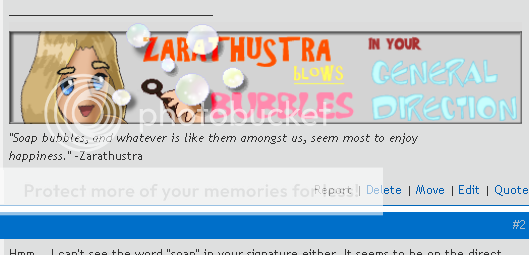
Lol, it blurred the screenshot. xD Can you take a screenshot of yours?
I know what you're thinking! "Neptune! Get rid of those filthy advertisements and give us back the Zarathustra siggy, you horrible person!" Well, don't worry about it, the Zara siggy will be back soon, new and improved! ^^ Meanwhile, just do what the sig tells you to. >.>Offline
#4 2009-10-20 04:33:38
- deatheater
- Scratcher
- Registered: 2008-04-11
- Posts: 1000+
Re: WOAH! Blurred image display on the website! o.O (this is totally new!)
It doesn't seem blurred to me, perhaps it is your pc, I can't see the soap either
Last edited by deatheater (2009-10-20 04:35:42)
Offline
#5 2009-10-20 04:37:18
- Owlfeather-
- Scratcher
- Registered: 2009-06-06
- Posts: 3
Re: WOAH! Blurred image display on the website! o.O (this is totally new!)
*! xD
This is weird. I see it the same way from my Owlfeather account (I am MRN). Can one of you two take a screenshot?

Offline
#6 2009-10-20 04:42:09
- deatheater
- Scratcher
- Registered: 2008-04-11
- Posts: 1000+
Re: WOAH! Blurred image display on the website! o.O (this is totally new!)
Well if it's blurred from your other account it's probably your computer
Offline
#7 2009-10-20 04:43:17
- MyRedNeptune
- Community Moderator
- Registered: 2007-05-07
- Posts: 1000+
Re: WOAH! Blurred image display on the website! o.O (this is totally new!)
deatheater wrote:
Well if it's blurred from your other account it's probably your computer
Not necessarily.
WILL you take a screenshot? :-D
Oh, I have an idea! I'll try looking at it from my uncle's computer!
I know what you're thinking! "Neptune! Get rid of those filthy advertisements and give us back the Zarathustra siggy, you horrible person!" Well, don't worry about it, the Zara siggy will be back soon, new and improved! ^^ Meanwhile, just do what the sig tells you to. >.>Offline
#8 2009-10-20 04:50:24
Re: WOAH! Blurred image display on the website! o.O (this is totally new!)
MyRedNeptune wrote:
deatheater wrote:
Well if it's blurred from your other account it's probably your computer
Not necessarily.
WILL you take a screenshot? :-D
Oh, I have an idea! I'll try looking at it from my uncle's computer!
So I don't have to take a picture? Okay. I'll use the time to steal your cookies!
Yummy.
I fall: It's a tragedy. You fall: It's comedy.
Hmph enjoy your fall - I get a lovely spring... without pans of new leaves.
Offline
#9 2009-10-20 04:51:08
- MyRedNeptune
- Community Moderator
- Registered: 2007-05-07
- Posts: 1000+
Re: WOAH! Blurred image display on the website! o.O (this is totally new!)
Chrischb wrote:
So I don't have to take a picture?
No you do. D8<
I know what you're thinking! "Neptune! Get rid of those filthy advertisements and give us back the Zarathustra siggy, you horrible person!" Well, don't worry about it, the Zara siggy will be back soon, new and improved! ^^ Meanwhile, just do what the sig tells you to. >.>Offline
#10 2009-10-20 04:56:27
- deatheater
- Scratcher
- Registered: 2008-04-11
- Posts: 1000+
Re: WOAH! Blurred image display on the website! o.O (this is totally new!)
MyRedNeptune wrote:
Chrischb wrote:
So I don't have to take a picture?
No you do. D8<
lol, I don't know how to XD
Offline
#11 2009-10-20 04:58:43
- MyRedNeptune
- Community Moderator
- Registered: 2007-05-07
- Posts: 1000+
Re: WOAH! Blurred image display on the website! o.O (this is totally new!)
My ucles comp displays it CORRECTLY!! D8
And... *le gasp!* I tried it in IE7 and it displayed normally! But I didn't see "Soap"! xD
This is how it was displayed:
I can see a bit of soap in the far right. xD
I know what you're thinking! "Neptune! Get rid of those filthy advertisements and give us back the Zarathustra siggy, you horrible person!" Well, don't worry about it, the Zara siggy will be back soon, new and improved! ^^ Meanwhile, just do what the sig tells you to. >.>Offline
#12 2009-10-20 05:00:24
- MyRedNeptune
- Community Moderator
- Registered: 2007-05-07
- Posts: 1000+
Re: WOAH! Blurred image display on the website! o.O (this is totally new!)
Lol, I know how to fix the soap thing. It's displayed properly now.
I know what you're thinking! "Neptune! Get rid of those filthy advertisements and give us back the Zarathustra siggy, you horrible person!" Well, don't worry about it, the Zara siggy will be back soon, new and improved! ^^ Meanwhile, just do what the sig tells you to. >.>Offline
#13 2009-10-20 05:03:37
- deatheater
- Scratcher
- Registered: 2008-04-11
- Posts: 1000+
Re: WOAH! Blurred image display on the website! o.O (this is totally new!)
MyRedNeptune wrote:
Lol, I know how to fix the soap thing. It's displayed properly now.
let me guess, enter XD
so it was your computer after all
Offline
#14 2009-10-20 05:03:50
- MyRedNeptune
- Community Moderator
- Registered: 2007-05-07
- Posts: 1000+
Re: WOAH! Blurred image display on the website! o.O (this is totally new!)
deatheater wrote:
MyRedNeptune wrote:
Chrischb wrote:
So I don't have to take a picture?
No you do. D8<
lol, I don't know how to XD

Press this button, then open a paint editor and click on "Paste"! But nvm, I don't need your screenshots now that the soap thing is fixed. xD
Anyways, I discovered what caused the problem! It was FIREFOX!! I need to find a way to fix it now... >.>
But then, I used Firefox on my uncle's computer as well, and it displayed properly!
I know what you're thinking! "Neptune! Get rid of those filthy advertisements and give us back the Zarathustra siggy, you horrible person!" Well, don't worry about it, the Zara siggy will be back soon, new and improved! ^^ Meanwhile, just do what the sig tells you to. >.>Offline
#15 2009-10-20 05:10:31
- deatheater
- Scratcher
- Registered: 2008-04-11
- Posts: 1000+
Re: WOAH! Blurred image display on the website! o.O (this is totally new!)
Perhaps it's a display setting or something 
and how do you post the picture online?, is what I was asking XD
Offline
#16 2009-10-20 05:12:03
- MyRedNeptune
- Community Moderator
- Registered: 2007-05-07
- Posts: 1000+
Re: WOAH! Blurred image display on the website! o.O (this is totally new!)
deatheater wrote:
Perhaps it's a display setting or something
and how do you post the picture online?, is what I was asking XD
Use an image hosting site like Photobucket. ^^
http://photobucket.com/
Actually, http://www.imagebeast.net/index.php is better because you don't have to register and it allows you to upload large images. So you can use that.
I know what you're thinking! "Neptune! Get rid of those filthy advertisements and give us back the Zarathustra siggy, you horrible person!" Well, don't worry about it, the Zara siggy will be back soon, new and improved! ^^ Meanwhile, just do what the sig tells you to. >.>Offline
#17 2009-10-20 05:13:36
- deatheater
- Scratcher
- Registered: 2008-04-11
- Posts: 1000+
Re: WOAH! Blurred image display on the website! o.O (this is totally new!)
thanks ^^
Offline
#19 2009-10-20 08:30:34
Re: WOAH! Blurred image display on the website! o.O (this is totally new!)
I never noticed it when I was using Firefox, but I recently switched to using Google Chrome and the images look 10x better.
It seems Firefox also blurs images on my laptop, if anyone knows why, it would be interesting to now
Last edited by 06dknibbs (2009-10-20 08:31:53)

Offline
#20 2009-10-20 09:23:05
- MyRedNeptune
- Community Moderator
- Registered: 2007-05-07
- Posts: 1000+
Re: WOAH! Blurred image display on the website! o.O (this is totally new!)
After descending into bottomless pits of my truly infinite, boundless, immeasurable, incalculable, incessant, inestimable, inexhaustible and illimitable knowledge, I have found the truth!!!! xD
...apparently pressing [ctrl]+[0] solves the problem.
Three cheers for MyRedNeptune. x3 Sing and bubble over, o Zarathustra!!
I know what you're thinking! "Neptune! Get rid of those filthy advertisements and give us back the Zarathustra siggy, you horrible person!" Well, don't worry about it, the Zara siggy will be back soon, new and improved! ^^ Meanwhile, just do what the sig tells you to. >.>Offline
#21 2009-10-20 09:31:12
Re: WOAH! Blurred image display on the website! o.O (this is totally new!)
MyRedNeptune wrote:
After descending into bottomless pits of my truly infinite, boundless, immeasurable, incalculable, incessant, inestimable, inexhaustible and illimitable knowledge, I have found the truth!!!! xD
...apparently pressing [ctrl]+[0] solves the problem.
Three cheers for MyRedNeptune. x3 Sing and bubble over, o Zarathustra!!
 So many adjectives, I think I'll go and get the English to Swedish dictionary!

Offline
#22 2009-10-20 09:43:30
- MyRedNeptune
- Community Moderator
- Registered: 2007-05-07
- Posts: 1000+
Re: WOAH! Blurred image display on the website! o.O (this is totally new!)
jacool wrote:
You go do that now. :3
I know what you're thinking! "Neptune! Get rid of those filthy advertisements and give us back the Zarathustra siggy, you horrible person!" Well, don't worry about it, the Zara siggy will be back soon, new and improved! ^^ Meanwhile, just do what the sig tells you to. >.>Offline
#23 2009-11-08 14:32:28
Re: WOAH! Blurred image display on the website! o.O (this is totally new!)
IE7 has HTML bugs
If you wanna know why Try going to this link in IE7 and in Firefox or any other browser
crashie.com
It doen't crash on IE8
Offline
#24 2009-11-08 14:53:43
- samurai768
- Scratcher
- Registered: 2009-07-21
- Posts: 1000+
Re: WOAH! Blurred image display on the website! o.O (this is totally new!)
jacool wrote:
Nothing fails with Chrome!!!
True that ^^
Offline
#25 2011-02-03 11:04:57
- scimonster
- Community Moderator
- Registered: 2010-06-13
- Posts: 1000+
Re: WOAH! Blurred image display on the website! o.O (this is totally new!)
MyRedNeptune wrote:
After descending into bottomless pits of my truly infinite, boundless, immeasurable, incalculable, incessant, inestimable, inexhaustible and illimitable knowledge, I have found the truth!!!! xD
...apparently pressing [ctrl]+[0] solves the problem.
Three cheers for MyRedNeptune. x3 Sing and bubble over, o Zarathustra!!
I'm sorry for bumping this, but I have to point out something.
Ctrl + 0 is the shortcut for reset page size. Ctrl + + makes it bigger, Ctrl + - shrinks.
 Moderator | Scratch Wiki Administrator | Coders' Shed Administrator
Scratch 2.0 is just around the corner! Prepare for the transition by beta testing. Your feedback will help make it the best it can be!
Offline
Pages: 1
- Index
- » Bugs and Glitches
- » WOAH! Blurred image display on the website! o.O (this is totally new!)