Scratch
archived forums
#1 2007-12-02 20:06:53
Why comments are not in Scratch 1.2
The Scratch Team decided not to include the comment block because we found it was not clear for beginners to understand what the block does.
Personally I was against that block because I felt it was not consistent with the rest of the Scratch user interface (having a different color from the block category where it was and a functionality that didn't exactly match its category either).
I also thought that commenting on code should not be a block but instead a property of a group of blocks. The metaphor of "code as blocks" seemed to break when blocks were also used for code metadata.
Given that there was a lot of discussion within the Scratch Team about this feature and we didn't want to delay the release of the new version until a satisfactory solution was implemented, we decided to get rid of that feature for now.
Hopefully the next version of Scratch can have comments. Someone in the team said "it's always easier to add a new feature than removing it". Very true.
Here is the answer from John Maloney, the lead developer of Scratch:
johnm wrote:
Q: Where's the comment block from the 1.2 beta?
A: There were some issues with the comment block design during beta test. Partly, the comment block looked so much like other blocks that some users thought it should do something and partily it was too bulky. But that first design did suggest some other commenting mechanisms (perhaps more like "postit" notes than blocks). Since we did not want to ultimately have two incompatible commenting mechanisms, we decided to remove the comment block from this release and try to create a better commenting mechanism for the next release.
Meanwhile, we've made the notes pane scrollable so, as an interim solution, you can put comments about your code there. (I know--its not as useful as being able to put comments right in the code--but it's better than nothing.)
-- John
Offline
#2 2007-12-02 20:24:18
- kevin_karplus
- Scratcher
- Registered: 2007-04-27
- Posts: 1000+
Re: Why comments are not in Scratch 1.2
Sad, now no one will be able to read and understand the Pinball game that my son and I wrote. We had extensive comments in it explaining how everything worked.
Quite frankly, I'm worried about a design team that values comments so little. What does their own code look like? Will anyone be able to maintain it once the current crop of student programmers finishes their degrees?
Offline
#3 2007-12-02 22:33:36
Re: Why comments are not in Scratch 1.2
Hi, all.
I'd like to add to Andres's comments about the comment block...
A few problems emerged during beta test. Several users thought it looked like it should do something (since it looks like a block) and partily, as we used it to comment our own projects, it felt heavy and bulky to us. But that first attempt suggested other commenting mechanisms (perhaps more like "postit" notes than blocks) that we think will be better in the long run.
The main reason to omit the comment block from this release was that we did not want to ultimately have two incompatible commenting mechanisms.
We haven't given up on comment blocks; quite the contrary! We will do our best to create a better commenting mechanism for the next release.
Meanwhile, we've made the notes pane scrollable so, as an interim solution, you could put comments about your code there. (I know--its not as useful as being able to put comments right in the code--but it's a good place to record your comments until the new commenting mechanism comes along.)
Over the nearly five year history of the Scratch project, we have tried and discarded many ideas that did not work as well as we'd hoped. One of the reasons Scratch is fun and easy to learn is that we have been ruthless about removing--or improving--features that do not carry their weight.
So, apologies to those who where looking forward to the new comment block. Please be patient a little longer.
-- John
Last edited by johnm (2007-12-02 22:34:29)
Offline
#4 2007-12-02 22:38:46
Re: Why comments are not in Scratch 1.2
Kevin, comments are powerful and we want to get them right.
While there are students programming Scratch, John Maloney, a research scientist, is the lead programmer. He already has a PhD in Computer Science and many years of experience programming in multiple languages. He even worked in the development of Squeak. He has worked closely with people like Alan Key and now with our group at MIT. Don't worry, when it comes to programming, there are hardly any other people I would trust more than John :-)
Offline
#5 2007-12-03 02:41:26
- Gigabyte123
- Scratcher
- Registered: 2007-10-15
- Posts: 100
Re: Why comments are not in Scratch 1.2
U no, I thought comments were for explaining what the block does for scratchers who have downloaded the project!! 
Last edited by Gigabyte123 (2007-12-03 02:42:12)
gather your confidence- reach for the skies... and always use deoderant!
Offline
#6 2007-12-03 11:04:06
- kevin_karplus
- Scratcher
- Registered: 2007-04-27
- Posts: 1000+
Re: Why comments are not in Scratch 1.2
Gigabyte123, you are right on what comments are for.
I respect the Scratch team highly, and believe that they will eventually come up with a decent commenting mechanism. Personally, I would have preferred the somewhat clunky comment boxes to no comments at all. for that matter, I would have been glad to wait another month for version 1.2 if it would have given them enough time to do comments right. It was, and remains, the most glaring hole in the scratch environment.
Offline
#7 2007-12-03 14:19:07
- Paddle2See
- Scratch Team
- Registered: 2007-10-27
- Posts: 1000+
Re: Why comments are not in Scratch 1.2
Let me put my voice behind Kevin's as to the importance of comments. In order to share code effectively (a prime feature of the Scratch environment) you need to understand what the originating programmer was thinking and how their code is meant to be used. I have looked at a lot of projects since I started using Scratch (way too much free time I guess) and a lot of it is very unclear. Comments in the scripting area would be invaluable. I would also like to see a way to comment variables and messages when they are declared. These features are often used for program control and it would be nice to know what the programmer was thinking when creating them; it is not always obvious.
As to how comments are implemented, I see nothing wrong with having more than one mechanisim. Many languages have one format for major comment blocks (such as the top of procedures) and another format for quick inline comments such as explaining control structure branches. I see value to both forms. I would like to see something similar to the Comment Block for long explanations (summary of the entire block for instance). I would also like to see an expanding text insertion point at the right side of every branch of every control structure and maybe the variable assignment blocks as well. This would allow short in-line commenting in the areas where it tends to get ugly. As for the variables and messages, I haven't given that a lot of thought but it would be nice to comment them as well.
In summary, I feel very strongly about code documentation and hope that the Scratch team will place it high on the list of priorities to help our begining programmers develop good habits.
A final thought: I can't tell you how many projects I've looked at that don't even tell the user what keys they are supposed to use to run the thing. Or that get loaded to the web with no Project Notes at all. It might be good to require that SOMETHING be put in the Project Notes before allowing it to be shared. Even better would be a hint to the young (or old) programmer that they might want tell the public what keys to push to run their new pride-and-joy creation. Thanks for listening, keep up the good work!
Last edited by Paddle2See (2009-12-20 21:25:15)

Offline
#8 2007-12-03 19:48:24
Re: Why comments are not in Scratch 1.2
Hi, Mark.
Thanks for sharing your thoughts about comments. I agree that it would not be bad to have top-level comment for a script (perhaps attached to the hat block, with a show/hide arrow) and some sort of of light-weight inline or per block comment.
I had not thought about comments on variables or broadcase messages--any thoughts on where those comments would be presented (especially the broadcast ones)?
It's true that some Scratchers users forget to include instructions on how to run their projects.We can encourage better documentation through good examples and gentle comments on projects that do not have clear instructions. But you have to keep in mind that for many Scratch users, just getting their first project working at all is cause for celebration. As they gain experience with sharing their own projects--and with using other users' projects--they will learn the value of good instructions. After all, you and I have had long careers over which to learn how to document our work; we were not born knowing it.
-- John
Offline
#9 2007-12-03 20:16:44
- kevin_karplus
- Scratcher
- Registered: 2007-04-27
- Posts: 1000+
Re: Why comments are not in Scratch 1.2
I encourage kids to make their instructions part of the animation, not in the notes, since the notes are not really visible when running the downloaded program. Making an extra background or sprite for instructions is pretty easy (about as easy as putting the instructions in the notes).
Comments on variables and broadcast messages would be nice, but would be hard to get people to actually do. I have enough trouble getting college students who are graded on their work to put meaningful comments on their variables.
I don't think we need comments on every block---that would be painful overkill if they were actually used. What we need are block comments that can be used at the beginning of a script or as the first block in a loop or conditional---pretty much what Scratch 1.2beta had.
These comments serve as the topic sentences for a paragraph of code, saying what the paragraph is supposed to do, with the code itself filling in the little details.
Offline
#10 2007-12-03 20:58:57
Re: Why comments are not in Scratch 1.2
Comments that could be attached to blocks in the way that MS Excel allows comments for cells would be very nice. For those not familiar, Excel lets the user add a comment to a cell, which then shows a little mark in the corner; "Hovering" on the cell makes a little window (like a "tool tip') show up.
I've been following the example of a project I saw (I forget whose it was) that uses an unattached "Say" block to leave a comment in the script area. This gets a bit cluttered, but works OK till the team figures out the best way to handle commenting.
Keep Scratching!
Offline
#11 2007-12-03 21:40:27
- Paddle2See
- Scratch Team
- Registered: 2007-10-27
- Posts: 1000+
Re: Why comments are not in Scratch 1.2
EdnaC wrote:
Comments that could be attached to blocks in the way that MS Excel allows comments for cells would be very nice. For those not familiar, Excel lets the user add a comment to a cell, which then shows a little mark in the corner; "Hovering" on the cell makes a little window (like a "tool tip') show up.
This is what I had in mind when I was talking about comments on every block...not that it is likely that people would ever a actually comment every block but that they would have the capability to comment any particular block.
As for comments on variables, maybe it's not as big a deal in Scratch where variables aren't used as much as other languages but I still think the ability to comment variables would be nice to have. I would use it. Comments on Messages probably are not as necessary since they don't tend to be as numerous and they can only be used in one specific way (triggering a stack), unlike variables which can take on a number of roles.
Offline
#12 2007-12-04 01:42:35
Re: Why comments are not in Scratch 1.2
Perhaps Scratch could present some kind of project note template by automatically gathering all threads that react to user-input (mouse over, key pressed, green flag pressed etc) and letting the 'programmer' explain in the project notes what this public interface does.
Jens Mönig
Offline
#13 2007-12-04 11:10:55
Re: Why comments are not in Scratch 1.2
kevin_karplus wrote:
Gigabyte123, you are right on what comments are for.
I respect the Scratch team highly, and believe that they will eventually come up with a decent commenting mechanism. Personally, I would have preferred the somewhat clunky comment boxes to no comments at all. for that matter, I would have been glad to wait another month for version 1.2 if it would have given them enough time to do comments right. It was, and remains, the most glaring hole in the scratch environment.
You can still use it if you want. Just download this project.
http://scratch.mit.edu/projects/Mick/62415
If anyone else wants to still use the comment block, download this project.
If the Scratch Team don't want the comment block to be used, I'll delete the project. 
If you're wondering how I got it, I collect Scratch IMAGE files. I have all the Scratch versions except '1.0.2' & '1.0 (beta)'. 
Last edited by Mick (2007-12-04 13:34:02)
Go to www.legoless.com
It's my blog.

Offline
#14 2007-12-07 05:57:29
Re: Why comments are not in Scratch 1.2
kevin_karplus wrote:
Sad, now no one will be able to read and understand the Pinball game that my son and I wrote. We had extensive comments in it explaining how everything worked.
Quite frankly, I'm worried about a design team that values comments so little. What does their own code look like? Will anyone be able to maintain it once the current crop of student programmers finishes their degrees?
There is still a way to make a "comment" block. Do this:
<repeat( 0
<say[ Put your comment here.
<end>
The Sprite will not say the words because it says <repeat( 0 .
~ihaveamac - visit ihaveamac.net
Offline
#15 2007-12-07 11:06:48
- kevin_karplus
- Scratcher
- Registered: 2007-04-27
- Posts: 1000+
Re: Why comments are not in Scratch 1.2
I have used the trick that "ihaveamac" suggests in the past, but it is really quite limited, as the comment lines are then limited to one line. The most important comments are block comments, which take more than one line.
Offline
#16 2007-12-07 21:55:43
Re: Why comments are not in Scratch 1.2
kevin_karplus wrote:
I have used the trick that "ihaveamac" suggests in the past, but it is really quite limited, as the comment lines are then limited to one line. The most important comments are block comments, which take more than one line.
I found a way to make multiple lines inside that block. Try this.
<repeat( 0
<say[ Put your comment here.
<say[ If you need more lines,
<say[ Put more blocks in!
<end>
~ihaveamac - visit ihaveamac.net
Offline
#17 2007-12-07 22:03:41
Re: Why comments are not in Scratch 1.2
Mick wrote:
kevin_karplus wrote:
Gigabyte123, you are right on what comments are for.
I respect the Scratch team highly, and believe that they will eventually come up with a decent commenting mechanism. Personally, I would have preferred the somewhat clunky comment boxes to no comments at all. for that matter, I would have been glad to wait another month for version 1.2 if it would have given them enough time to do comments right. It was, and remains, the most glaring hole in the scratch environment.You can still use it if you want. Just download this project.
http://scratch.mit.edu/projects/Mick/62415
If anyone else wants to still use the comment block, download this project.
If the Scratch Team don't want the comment block to be used, I'll delete the project.
If you're wondering how I got it, I collect Scratch IMAGE files. I have all the Scratch versions except '1.0.2' & '1.0 (beta)'.
We can still use the comment block!? Cool!
I should stop posting on this topic.
~ihaveamac - visit ihaveamac.net
Offline
#18 2007-12-08 03:13:53
- SimpleScratch
- Scratcher
- Registered: 2007-05-25
- Posts: 100+
Re: Why comments are not in Scratch 1.2
Mick wrote:
You can still use it if you want. Just download this project.
http://scratch.mit.edu/projects/Mick/62415
If anyone else wants to still use the comment block, download this project.
If the Scratch Team don't want the comment block to be used, I'll delete the project.
If you're wondering how I got it, I collect Scratch IMAGE files. I have all the Scratch versions except '1.0.2' & '1.0 (beta)'.
As much as we all want comment blocks (and lots of other things as well) surely this will cause chaos in the Scratch world.
I'd take it off ASAP.
regards
Simon
PS but I'd love to hear the explanation of what's actually going on to achieve this :-)
Last edited by SimpleScratch (2007-12-08 03:14:24)
Offline
#19 2007-12-11 22:25:58
Re: Why comments are not in Scratch 1.2
ihaveamac wrote:
Mick wrote:
kevin_karplus wrote:
Gigabyte123, you are right on what comments are for.
I respect the Scratch team highly, and believe that they will eventually come up with a decent commenting mechanism. Personally, I would have preferred the somewhat clunky comment boxes to no comments at all. for that matter, I would have been glad to wait another month for version 1.2 if it would have given them enough time to do comments right. It was, and remains, the most glaring hole in the scratch environment.You can still use it if you want. Just download this project.
http://scratch.mit.edu/projects/Mick/62415
If anyone else wants to still use the comment block, download this project.
If the Scratch Team don't want the comment block to be used, I'll delete the project.
If you're wondering how I got it, I collect Scratch IMAGE files. I have all the Scratch versions except '1.0.2' & '1.0 (beta)'.We can still use the comment block!? Cool!
I should stop posting on this topic.
Lol. I dont even get what the comment block do, so, I saw its useless.
Offline
#20 2007-12-11 22:44:28
Re: Why comments are not in Scratch 1.2
beebe wrote:
Lol. I dont even get what the comment block do, so, I saw its useless.
Comments are NOT useless. Ever look at some one else project and felt utterly confused about what each of the scripts do? Comments could be there to explain what the scripts do.
Hi, I am Archmage coder extraordinaire. I do Scratch,pascal,java,php,html, AS2 and AS3. Leave me a message if you want coding advice. Also check out my personal website, lots of good stuff about web development, Flash, and Scratch (v1 and v2) !
Offline
#22 2007-12-18 12:41:51
- kevin_karplus
- Scratcher
- Registered: 2007-04-27
- Posts: 1000+
Re: Why comments are not in Scratch 1.2
Comments are needed even in scratch programs. Projects like canthiar's ray tracer and the pinball game that I wrote with my son can be difficult to understand without detailed explanations.
Offline
#23 2007-12-18 12:49:04
Re: Why comments are not in Scratch 1.2
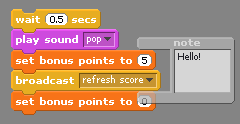
I'd like to show you an image of how the comment / note block can look like. I really like comments, an i really need them too... So that's the reason why I want to show my way of commenting, who knows, maybe it is usefull...
It is a transparent block, that you can attach at a few other blocks. I would suggest that you can select multiple blocks, right mouse click, and then select "Add note...".
I hope it's usefull!
Joren
PS: for those who are thinking that they need fotoshop, the image above is done with MS paint and the scratch ghost effect only...
Last edited by JSO (2007-12-18 12:50:20)

Offline
#25 2008-01-11 06:28:08
Re: Why comments are not in Scratch 1.2
Another way to comment clearly without an actual block is to include these blocks where the comment should go:
Code:
say(see #1) for (0) secs
Then write a note #1 in your project notes. Then anyone who downloads the project will know to look at #1 when they see that script. The key is that you write "0 secs" then the note will not actualy be shown on the website.
Beep away!

Offline