Scratch
archived forums
#201 2012-10-03 20:56:49
Re: Report bugs and Glitches in the *New* Flash player here!
Lightnin wrote:
Flash player updated to v.155
- use old variable and list colors when running on old website
- bug: whirl and fisheye effects not centered in full- and quarter-screen modes
- bug: size of pixels in pixelate did not scale in full- and quarter-screen modes
- bug: stop button or "hide all sprites" leaves orphan talk bubbles for deleted clones
Cool! Can we do the online preview in this version? And yay, old variable colors  . I hope you guys can fix those annoying bugs with whirl and pixelate. Looks like 2.0 is really coming along!
........................................................................................................................................................................................................................................
Offline
#202 2012-10-04 14:23:06
- Paddle2See
- Scratch Team
- Registered: 2007-10-27
- Posts: 1000+
Re: Report bugs and Glitches in the *New* Flash player here!
TRocket wrote:
not really a bug but, on my project http://scratch.mit.edu/projects/TRocket/1641394 if you type a letter it says NaN in the variable in the top-right, if you type Infinity it says 0. In the java player Infinity would be NaN. It seems the Flash Player treats "Infinity" as a number. This probably won't affect many projects but

This is interesting...you get different results depending on whether you enter "Infinity" or "infinity"!

Offline
#203 2012-10-05 13:07:29
Re: Report bugs and Glitches in the *New* Flash player here!
http://scratch.mit.edu/projects/PR0G4M3R4563/2814283
System:Windows 7/or 64-bit
Browser:Firefox 15.0.1
Flash version 11.3.300.270
Description:The screen shakes when you move.
Last edited by starwiz (2012-10-05 13:07:50)
I am

Offline
#204 2012-10-05 18:15:07
#205 2012-10-06 11:18:38
- randomgamemaker
- Scratcher
- Registered: 2010-06-14
- Posts: 32
Re: Report bugs and Glitches in the *New* Flash player here!
Furybird wrote:
jontmy00 wrote:
Furybird wrote:
The project in my signature doesn't work in the new flash player
Give details...
This project doesn't work in flash player on my windows 7 firefox browser!
That just links to your page.
Offline
#206 2012-10-06 13:15:17
- berberberber
- Scratcher
- Registered: 2012-03-08
- Posts: 1000+
Re: Report bugs and Glitches in the *New* Flash player here!
Some of my sprites are clipped.

Offline
#207 2012-10-06 17:34:37
#208 2012-10-06 17:35:19
Re: Report bugs and Glitches in the *New* Flash player here!
starwiz wrote:
Wes64 wrote:
you can scroll the page in full-screen mode
You have always been able to do that.
oh
its still weird though
Experienced 2.0 Tester: Ask me questions!
Using Firefox 13.0, Flash plugin version 11.4.402.287, and Windows XP Professional.
Offline
#209 2012-10-07 12:23:40
Re: Report bugs and Glitches in the *New* Flash player here!
berberberber wrote:
Some of my sprites are clipped.
But that bug has already been fixed!
 In 2012, scientists at the LHC discovered the Higgs boson, which explains the source of the masses of the W+, W-, and Z bosons, as well as fermions.
Offline
#210 2012-10-07 18:05:42
- jackajacka
- Scratcher
- Registered: 2012-05-11
- Posts: 57
Re: Report bugs and Glitches in the *New* Flash player here!
Rendering is still bad on any webpage. Stuff gets clipped everywhere and on 1s1s'es things still shake horribly if you have the right screen size. If you move in, or out a little using ctrl,shift, - or + it makes things look really bad.

Offline
#211 2012-10-08 14:19:24
- Paddle2See
- Scratch Team
- Registered: 2007-10-27
- Posts: 1000+
Re: Report bugs and Glitches in the *New* Flash player here!
berberberber wrote:
Some of my sprites are clipped.
Can you give a link to a project showing this problem?
jackajacka wrote:
Rendering is still bad on any webpage. Stuff gets clipped everywhere and on 1s1s'es things still shake horribly if you have the right screen size. If you move in, or out a little using ctrl,shift, - or + it makes things look really bad.
Can you explain what you mean by "Rendering is bad"? And I'd love to have a link to a project where things are getting clipped, if you could take a moment and give me one. By "stuff", I guess you mean sprites? Or is it something else?
Thanks for reporting these things...it really helps us figure out what needs fixin'
Last edited by Paddle2See (2012-10-08 14:22:06)
Offline
#212 2012-10-08 21:42:35
- jackajacka
- Scratcher
- Registered: 2012-05-11
- Posts: 57
Re: Report bugs and Glitches in the *New* Flash player here!
Paddle2See wrote:
berberberber wrote:
Some of my sprites are clipped.
Can you give a link to a project showing this problem?
jackajacka wrote:
Rendering is still bad on any webpage. Stuff gets clipped everywhere and on 1s1s'es things still shake horribly if you have the right screen size. If you move in, or out a little using ctrl,shift, - or + it makes things look really bad.
Can you explain what you mean by "Rendering is bad"? And I'd love to have a link to a project where things are getting clipped, if you could take a moment and give me one. By "stuff", I guess you mean sprites? Or is it something else?
Thanks for reporting these things...it really helps us figure out what needs fixin'
Yes, stuff is sprites, and variables too. It happens to all sprites it seems. If you zoom in/out to a certain size, sprites get clipped. In my newest project, things shake at my normal zoom. http://scratch.mit.edu/projects/jackajacka/2818543 This is an example of shaking with the correct zoom. Ends of variables get clipped too still.
Offline
#213 2012-10-09 01:35:37
Re: Report bugs and Glitches in the *New* Flash player here!
This is about one of my sillybilly project.
(A scratcher commented, or report this glitches. Then I try it out and found out that it's true.)
I made the project so when the it starts, bunchs of snowflakes falls. It works on Java, but it doesn't work in Flash.
I progammed the Unicorn to move when arrow keys pressed. But it just stood there.
I found out that this project works perfectly only in Java.
Project link: (So you can track it out.) http://scratch.mit.edu/projects/Rumanti/2786621
Scratch Transition Team
Helps you survive the BING BANG! (big bang)
Offline
#214 2012-10-09 02:33:19
Re: Report bugs and Glitches in the *New* Flash player here!
Paddle2See wrote:
berberberber wrote:
Some of my sprites are clipped.
Can you give a link to a project showing this problem?
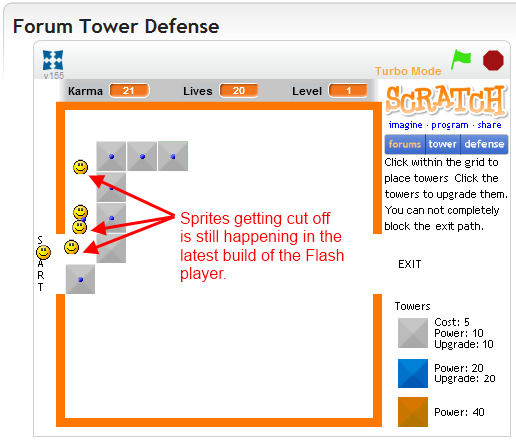
My forum tower defense game has cutoff sprites. I reported this on page one of this thread and I'm still seeing the issue tonight. Here's the latest screenshot:
http://boltbait.com/images/SpritesCutOff155.png
As I am still not allowed to post pictures hosted on my own site, I have made the above a link.
Animated sigs must be banned!





Offline
#215 2012-10-09 05:38:53
- Paddle2See
- Scratch Team
- Registered: 2007-10-27
- Posts: 1000+
Re: Report bugs and Glitches in the *New* Flash player here!
BoltBait wrote:
Paddle2See wrote:
berberberber wrote:
Some of my sprites are clipped.
Can you give a link to a project showing this problem?
My forum tower defense game has cutoff sprites. I reported this on page one of this thread and I'm still seeing the issue tonight. Here's the latest screenshot:
http://boltbait.com/images/SpritesCutOff155.png
As I am still not allowed to post pictures hosted on my own site, I have made the above a link.
Thanks! I was able to demonstrate this bug on Chrome. I found that it seems to be a function of what zoom level you have your browser on and can be triggered by flipping from one tab to another, forcing the page to redisplay. For me, it only happens at the lowest zoom level (when the sprites are the smallest). I suspect it is the anti-aliasing causing this problem.
On the example of your Forum Defender project, I found that clipping seemed to occur only on the right and bottom edges of your circular smiley-face sprites. Have you seen anything different? Do you have any different examples of this issue?
=== Update
It seems that the problem happens when you position some costumes at non-integer coordinate locations (by moving at an angle that isn't a multiple of 90 degrees, for example). I've tested out a possible workaround where the sprite position is relocated to integer coordinate values which might be acceptable for some projects. I've also put this on the bug list for the Development team to look into.
Last edited by Paddle2See (2012-10-09 11:05:38)
Offline
#216 2012-10-09 09:14:01

#217 2012-10-09 09:15:20
Re: Report bugs and Glitches in the *New* Flash player here!
legomanz wrote:
all the sprites that where draggable online go to the top of the screen when you click on them

Isn't it like that in the current Scratch?
FOR ALL THE NEWS ON UPDATES FOR SIMPLISTICRAFT, CLICK HERE.
Offline
#218 2012-10-11 09:58:07
#219 2012-10-11 12:10:39
- Paddle2See
- Scratch Team
- Registered: 2007-10-27
- Posts: 1000+
Re: Report bugs and Glitches in the *New* Flash player here!
legomanz wrote:
all the sprites that where draggable online go to the top of the screen when you click on them
Can you post a link to a project showing this problem? That would be very helpful.
Offline
#220 2012-10-11 23:32:33
Re: Report bugs and Glitches in the *New* Flash player here!
>Main Passage http://scratch.mit.edu/forums/viewtopic.php?id=107691
>Affected Project http://scratch.mit.edu/projects/KrIsMa/2830833
<I use Scratch 1.4
<I use IE.8
<>Test 1, 2, and 4 seems to be only affecting the top left corner.
Effects on Fullscreen does not show up in the project. It seems like it just affects a little of the corners. There is a huge difference from offline, online normal screen, and online full screen.
Last edited by KrIsMa (2012-10-11 23:46:08)

The Scratch Team (and fellow scratchers!) is/are so nice!!!
Offline
#221 2012-10-12 00:32:15
- Ludburghmdm
- Scratcher
- Registered: 2010-04-02
- Posts: 100+
Re: Report bugs and Glitches in the *New* Flash player here!
KrIsMa wrote:
>Main Passage http://scratch.mit.edu/forums/viewtopic.php?id=107691
>Affected Project http://scratch.mit.edu/projects/KrIsMa/2830833
<I use Scratch 1.4
<I use IE.8
<>Test 1, 2, and 4 seems to be only affecting the top left corner.
Effects on Fullscreen does not show up in the project. It seems like it just affects a little of the corners. There is a huge difference from offline, online normal screen, and online full screen.
Oh yeah, thats a (sort of) known bug.
The effects work on full screen, but the effects aren't centered correctly on the sprite.
Also, another bug that I experienced, while loading, if you full screen, the loading indicator goes to the top-right corner of the screen O_O

Offline
#222 2012-10-12 10:36:39
Re: Report bugs and Glitches in the *New* Flash player here!
Ludburghmdm wrote:
KrIsMa wrote:
>Main Passage http://scratch.mit.edu/forums/viewtopic.php?id=107691
>Affected Project http://scratch.mit.edu/projects/KrIsMa/2830833
<I use Scratch 1.4
<I use IE.8
<>Test 1, 2, and 4 seems to be only affecting the top left corner.
Effects on Fullscreen does not show up in the project. It seems like it just affects a little of the corners. There is a huge difference from offline, online normal screen, and online full screen.Oh yeah, thats a (sort of) known bug.
The effects work on full screen, but the effects aren't centered correctly on the sprite.
Also, another bug that I experienced, while loading, if you full screen, the loading indicator goes to the top-right corner of the screen O_O
Same here, it just repositions itself after a while.
Last edited by KrIsMa (2012-10-12 10:36:55)
The Scratch Team (and fellow scratchers!) is/are so nice!!!
Offline
#223 2012-10-12 11:36:56
- Paddle2See
- Scratch Team
- Registered: 2007-10-27
- Posts: 1000+
Re: Report bugs and Glitches in the *New* Flash player here!
Paddle2See wrote:
legomanz wrote:
all the sprites that where draggable online go to the top of the screen when you click on them
Can you post a link to a project showing this problem? That would be very helpful.
Actually, I was surprised to learn that this works this same way in Scratch 1.4, when you view it on full screen mode. So I think this is not a bug.
Offline
#224 2012-10-14 08:49:34
Re: Report bugs and Glitches in the *New* Flash player here!
Ludburghmdm wrote:
KrIsMa wrote:
>Main Passage http://scratch.mit.edu/forums/viewtopic.php?id=107691
>Affected Project http://scratch.mit.edu/projects/KrIsMa/2830833
<I use Scratch 1.4
<I use IE.8
<>Test 1, 2, and 4 seems to be only affecting the top left corner.
Effects on Fullscreen does not show up in the project. It seems like it just affects a little of the corners. There is a huge difference from offline, online normal screen, and online full screen.Oh yeah, thats a (sort of) known bug.
The effects work on full screen, but the effects aren't centered correctly on the sprite.
Also, another bug that I experienced, while loading, if you full screen, the loading indicator goes to the top-right corner of the screen O_O
Wasn't that bug already fixed?
In 2012, scientists at the LHC discovered the Higgs boson, which explains the source of the masses of the W+, W-, and Z bosons, as well as fermions.Offline
#225 2012-10-15 07:35:31
Re: Report bugs and Glitches in the *New* Flash player here!
A new bug appeared on my project. Only 3 people have this bug. They can't click on buttons. So the "When xxx clicked" block doesn't works everytime OR there's an other problem.
When you start the project a logo sprite appears on the screen in the first layer. After one second it starts the ghost effect, until the effect is by 100%.
After this it should hide, but maybe it doesn't hides everytime, because a not hidden logo with 100% ghost effect on the first layer would create the same problem.
I asked them for their browser. One says, it doesn't works with firefox, but it works with chrome. The other one says, he uses chrome 22 and it doesn't work.
Last edited by TM_ (2012-10-15 07:35:54)


Offline