Scratch
archived forums
Topic closed
- Index
- » Bugs and Glitches
- » Report bugs and Glitches in the *New* Flash player here!
#1 2012-09-10 12:03:13
Report bugs and Glitches in the *New* Flash player here!
[Player updated to v164 10/17/12 1:40pm EST]
We've released a Release Candidate version of the new Flash-based Scratch project player. You can try it out by clicking the link to the right of each project on the project page. Like most new features, it will have glitches! We need your help reporting the glitches so we can fix them.
Important note: Our goal is to make projects work in the Flash-based player just like they do in Scratch 1.4. There may be some unavoidable differences (e.g. the Flash-based player is more efficient, which can affect timing in some projects), but we want to get as close as possible. For cases where the old Java-based player doesn't do the same thing as Scratch 1.4, it's Scratch 1.4 that counts!
Note that this player scales when you zoom in and out in your browser, which can distort the graphics slightly. If the text is hard to read or the graphics look strange, make sure that your browser is set to view the page at actual size.
When you find a problem with the way a project runs in the flash-player, first check to see if it's a known glitch in the list below.
Glitches to be fixed
Fixed Glitches
Hovering over full screen icon causes it to flicker
Background reporter always reports 0
Text in variable / list watchers cut off in all Windows browsers
This version has a number of improvements:
list reporter should suppress spaces when list contains only single letters
global variables not being updated when dragging sprite in full-screen mode
talk bubble not tracking dragged sprite in full-screen mode
touching color white reports true when sprite is partly off screen
If it's not already in the list of glitches, copy the bug report template and make a new post. Fill in the blanks and give us as much info about the bug as you can. Remember, to fix a bug, we have to be able to first make it happen on our computers, so be sure to tell us each step we need to reproduce the bug.
Bug Report Template wrote:
Your computer's Operating System: [examples: Windows, Mac, or Ubuntu]
Your web browser's name and version: [examples: Internet Explorer 7, Firefox 3, Chrome]
Flash version: [Right click on the project and look for the number after [About Adobe Flash]
Description of Problem:
Link to project:
Thanks in advance for your help!
p.s. You can find the old "Beta" flash player glitches thread here:
http://scratch.mit.edu/forums/viewtopic.php?id=57153
Last edited by Lightnin (2012-10-17 13:41:32)
Help Scratchers make the leap to 2.0!

Offline
#2 2012-09-10 12:16:22
Re: Report bugs and Glitches in the *New* Flash player here!
when you hover over the edge of the full screen button it kinda flickers. Maybe this could be fixed by adding a hover threshold? and when you hover over it in non-fullscreen it shows you a shrink icon and when you hover over it in fullscreen noting happens...
Last edited by TRocket (2012-09-10 12:24:44)

Offline
#3 2012-09-10 12:20:18
- firedrake969_test
- Scratcher
- Registered: 2012-08-08
- Posts: 500+
Re: Report bugs and Glitches in the *New* Flash player here!
That, and there's no shift-click fullscreen.
Alt of Firedrake969.
Offline
#4 2012-09-10 12:21:58
Re: Report bugs and Glitches in the *New* Flash player here!
OS: Windows Vsita
Web Browser: Chrome
Version: v11
Problem(s): Sometimes, when I click, the player freezes. There is no Turbo Mode. Scrolling can sometimes make the sprites edges flicker.
Problem links:
Scrolling flicker.
Player freezing
Hoped it helped!
[Edit Lightnin: Checked it out, but couldn't get it to freeze. Also, the flicker seems to be the same on the Java player as it is in Flash. ]
Last edited by Lightnin (2012-09-10 21:11:27)
Offline
#5 2012-09-10 12:27:38
- sonicfan12p
- Scratcher
- Registered: 2011-11-16
- Posts: 1000+
Re: Report bugs and Glitches in the *New* Flash player here!
That's odd, the fullscreen button isn't there anymore, it was, and I noticed TRocket's problem, but now it's gone. 
Why are the secret organizations getting all the attention?

Offline
#6 2012-09-10 12:28:53
- firedrake969_test
- Scratcher
- Registered: 2012-08-08
- Posts: 500+
Re: Report bugs and Glitches in the *New* Flash player here!
There's a turbo mode.
Alt of Firedrake969.
Offline
#7 2012-09-10 12:33:57
Re: Report bugs and Glitches in the *New* Flash player here!
http://scratch.mit.edu/projects/taddl/2771043 doesn't work
(it didn't work in the old player as well )
[Edit by Lightnin: Confirmed. Need to figure out what's causing it to fail. If someone would like to try to break this project into pieces to see which causes the failure, that'd be great! Thanks for the report!]
[Edit by Johnm: It gets an error when loading. Will investigate.]
Last edited by johnadmin (2012-09-12 06:47:18)
Offline
#8 2012-09-10 12:41:56
- Borrego6165
- Scratcher
- Registered: 2011-03-10
- Posts: 1000+
Re: Report bugs and Glitches in the *New* Flash player here!
Your computer's Operating System: Windows 7 (64)
Your web browser's name and version: Chrome
Flash version: 11
Description of Problem:
First Play
General
Sometimes freezes for around a second, except once when it freezed for about 3 1/2. It happened during the main menu.
Bugs
The 'X' button did not show on the Full Map screen to close it, and a button in the build mode did not appear either although these worked fine in other players, perhaps it skipped a script?
You can't restart the project, it just keeps switching to turbo mode when you click the green flag (even after you've stopped all scripts)
Second Play
Strangely after re-loading the page and playing it again, non of the above glitches occurred.
Link to project: Project Link
[Edit by Lightnin: Thanks for reporting! Can you try it again a couple of times, to confirm that the glitches don't show up? If they don't, it was probably a caching issue of some kind, and probably won't happen again.]
Last edited by Lightnin (2012-09-10 21:10:56)
Generation:4001 Build a beautiful city, with over 50 objects and over 10000 tiles per city! This simulates traffic, pollution, tourism, crime and more!
Offline
#9 2012-09-10 12:48:12
Re: Report bugs and Glitches in the *New* Flash player here!
btw this: http://scratch.mit.edu/projects/taddl/2751042
doesn't work 2
[Edit by Lightnin: Indeed! Seems like a layering issue. It would help a *ton* if someone could try making the simplest project possible that demonstrates the same problem that this one has.]
Last edited by Lightnin (2012-09-10 21:12:47)
Offline
#10 2012-09-10 12:52:31
Re: Report bugs and Glitches in the *New* Flash player here!
in browser firefox on this game http://scratch.mit.edu/projects/AtomicBawm3/2611204 it takes a while to load then it does not work in the old flash player it worked fine 
[Edit by Lightnin: Ah - the character falls through the floor. Can you fill out the template above to give the rest of your info? Is there anything else that doesn't behave as expected? Thanks!] [edit by legomanz: everything else is fine]
Last edited by legomanz (2012-10-16 19:43:58)

Offline
#11 2012-09-10 13:01:31
- scimonster
- Community Moderator
- Registered: 2010-06-13
- Posts: 1000+
Re: Report bugs and Glitches in the *New* Flash player here!
firedrake969_test wrote:
There's a turbo mode.
Where?
 Moderator | Scratch Wiki Administrator | Coders' Shed Administrator
Scratch 2.0 is just around the corner! Prepare for the transition by beta testing. Your feedback will help make it the best it can be!
Offline
#13 2012-09-10 13:17:56
- scimonster
- Community Moderator
- Registered: 2010-06-13
- Posts: 1000+
Re: Report bugs and Glitches in the *New* Flash player here!
taddl wrote:
scimonster wrote:
firedrake969_test wrote:
There's a turbo mode.
Where?
shiftclick the green flag
I guess it just wasn't working before for some reason...
Moderator | Scratch Wiki Administrator | Coders' Shed AdministratorScratch 2.0 is just around the corner! Prepare for the transition by beta testing. Your feedback will help make it the best it can be!
Offline
#15 2012-09-10 13:36:58
Re: Report bugs and Glitches in the *New* Flash player here!
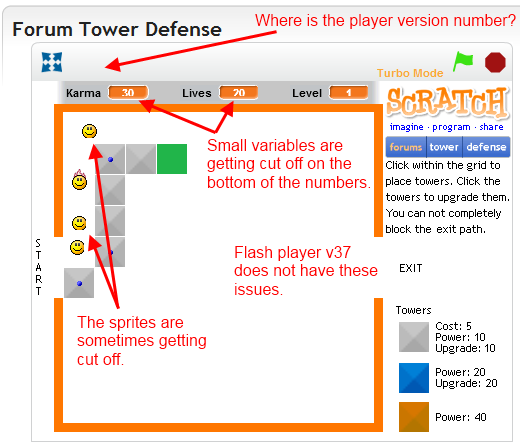
This is probably due to caching the CSS file.
I tried clearing my cache, but that didn't work. It is probably being cached by my proxy server, or somewhere else up the line from me where I don't have control over the machine.
If you were to change the name of the CSS file it would force a new load for everyone.
Last edited by BoltBait (2012-09-10 13:58:25)
Animated sigs must be banned!





Offline
#17 2012-09-10 14:01:16
Re: Report bugs and Glitches in the *New* Flash player here!
Your computer's Operating System: Windows
Your web browser's name and version: Chrome
Flash version: 11.3.31.232... 
Description of Problem: The music duplicated itself.
Link to project: here 
[Johnm edit: The music works okay for me. Could you try it again?]
Last edited by johnadmin (2012-09-12 06:54:22)
Me live on 2.0 now

Offline
#18 2012-09-10 15:08:30
Re: Report bugs and Glitches in the *New* Flash player here!
Your computer's Operating System: Windows
Your web browser's name and version: Chrome
Flash version: 11.3.31.232
Description of Problem: On sample projects in this project, the list's scrollbar doesn't work...
Link to project: here
GENERATION 33: The first time you see this, copy it into your sig on any forum and add 1 to the generation. Social experiment
Offline
#19 2012-09-10 15:19:19
Re: Report bugs and Glitches in the *New* Flash player here!
BoltBait wrote:
http://i57.photobucket.com/albums/g228/ … Issues.png
This is probably due to caching the CSS file.
I tried clearing my cache, but that didn't work. It is probably being cached by my proxy server, or somewhere else up the line from me where I don't have control over the machine.
If you were to change the name of the CSS file it would force a new load for everyone.
Interesting! We had to flush our Varnish cache to make the new player available. But we didn't make any css changes (well, some embedded styles applied through javascript). In case it's helpful, here's the change that pushed the new player:
http://trac.assembla.com/scratchr/changeset/1587
(The new .swf has a different name than the old one.)
Help Scratchers make the leap to 2.0!
Offline
#20 2012-09-10 15:21:51
Re: Report bugs and Glitches in the *New* Flash player here!
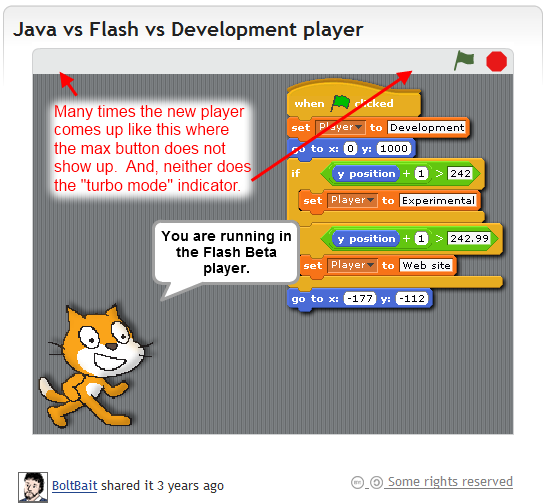
Well, I'm at a loss then. I just assumed that the CSS file had changed because of the hight of the gray bar on top of the online player. In the screenshot you can see that it is too short when the max button doesn't show up.
FWIW, the player is being set to 387 height even though the javascript says to set it to 401 when viewing source of the page. You can verify this by looking at the screenshot above.
Last edited by BoltBait (2012-09-10 15:56:27)
Animated sigs must be banned!
Offline
#21 2012-09-10 15:45:28
Re: Report bugs and Glitches in the *New* Flash player here!
I've also encountered a glitch on this game. The details are the same as my last enquiry and the glitch is that the health variable switches from slider to non-slider and back and forth etc. etc.
Offline
#22 2012-09-10 15:49:21
Re: Report bugs and Glitches in the *New* Flash player here!
When Green Flag Clicked, It Doesn't Play Any Sound For 1 Second
[Edit: lengthy empty spaces removed.]
Last edited by Lightnin (2012-09-10 16:24:13)
www.scratch.mit.edu/users/uzay
MAKE YOUR AD! http://scratch.mit.edu/projects/uzay/2533816
Offline
#24 2012-09-10 16:40:38
Re: Report bugs and Glitches in the *New* Flash player here!
I cannot use the new Flash Player.
Speaking of which, on the Java Player, the ones digit for the binary Scratch Cat is wrong.
Last edited by 3sal2 (2012-09-10 16:44:27)
 In 2012, scientists at the LHC discovered the Higgs boson, which explains the source of the masses of the W+, W-, and Z bosons, as well as fermions.
Offline
#25 2012-09-10 16:46:31
Re: Report bugs and Glitches in the *New* Flash player here!
Remember, the new player was written on a new file and hasn't been fully tested.
In 2012, scientists at the LHC discovered the Higgs boson, which explains the source of the masses of the W+, W-, and Z bosons, as well as fermions.Offline
Topic closed
- Index
- » Bugs and Glitches
- » Report bugs and Glitches in the *New* Flash player here!